Agent+MCP实践
Agent+MCP实践
1.简介
模型上下文协议(Model Context Protocol, MCP)是用于将AI应用连接到外部系统的开源标准。
使用MCP,像ChatGPT这样的AI应用可以连接到数据源(例如本地文件、数据库)、工具(例如搜索引擎、计算器)和工作流(例如专门的提示),使其能够访问关键信息并执行任务。
可以将MCP想象成AI应用的USB-C接口。正如USB-C提供了连接电子设备的标准化方式一样,MCP也提供了将AI应用连接到外部系统的标准化方式。
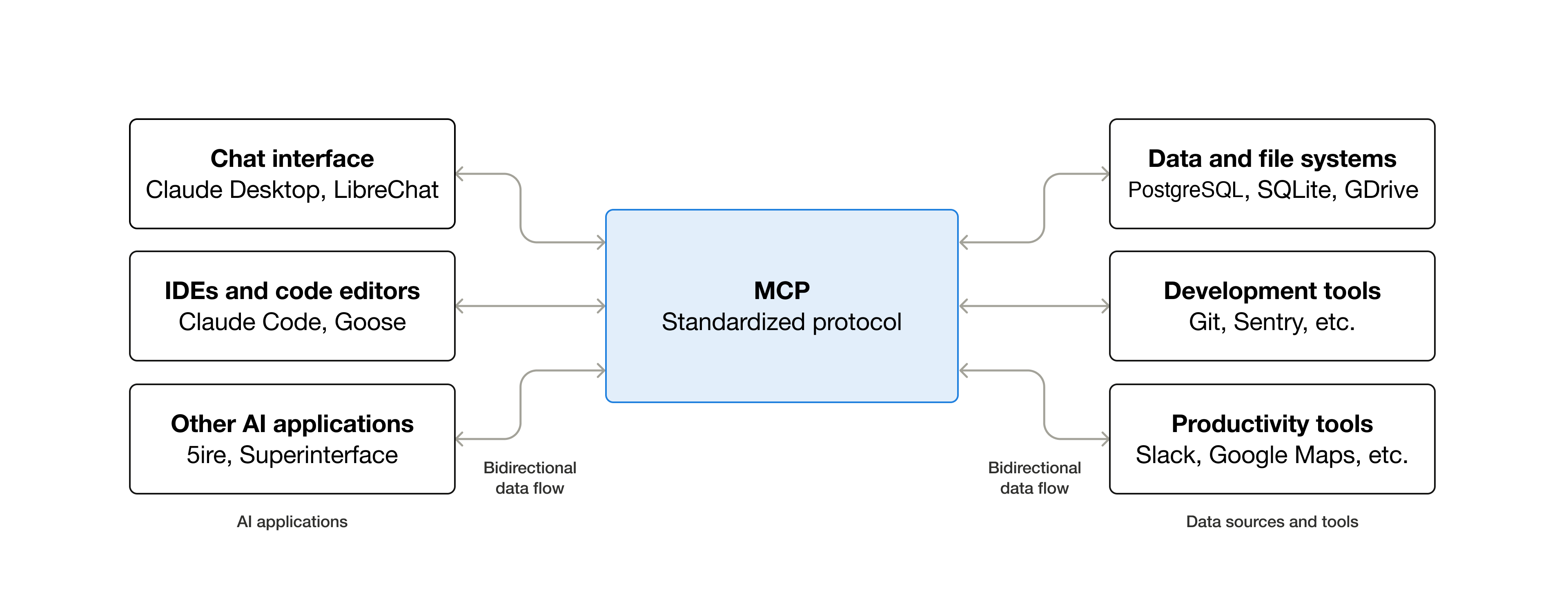
本文将介绍如何创建MCP服务器,并在Agent中通过客户端连接到MCP服务器。
参考:https://docs.langchain.com/oss/python/langchain/mcp
2.安装依赖
1
pip install langchain-mcp-adapters fastmcp
3.创建MCP服务器
可以使用FastMCP库来创建MCP服务器(基于官方MCP SDK实现)。
下面的示例创建了两个MCP服务器,分别用于数学计算和天气查询。
math_server.py
1
2
3
4
5
6
7
8
9
10
11
12
13
14
15
16
from fastmcp import FastMCP

mcp = FastMCP('Math')

@mcp.tool()
def add(a: int, b: int) -> int:
    """Add two numbers"""
    return a + b

@mcp.tool()
def multiply(a: int, b: int) -> int:
    """Multiply two numbers"""
    return a * b

if __name__ == '__main__':
    mcp.run(transport='stdio')
weather_server.py
1
2
3
4
5
6
7
8
9
10
11
from fastmcp import FastMCP

mcp = FastMCP('Weather')

@mcp.tool()
async def get_weather(location: str) -> str:
    """Get weather for location."""
    return f"It's always sunny in {location}"

if __name__ == '__main__':
    mcp.run(transport='streamable-http')
MCP支持不同的客户端-服务器通信的传输(transport)机制。
stdio:客户端将服务器作为子进程启动,并通过标准输入/输出进行通信。streamable-http:使用HTTP请求进行客户端-服务器通信。
详见文档Transports。
4.创建MCP客户端Agent
langchain-mcp-adapters库使Agent能够使用一个或多个MCP服务器定义的工具(底层也是基于官方MCP SDK实现)。
下面创建一个能连接MCP服务器的Agent。
1
2
3
4
5
6
7
8
9
10
11
12
13
14
15
16
17
18
19
20
21
22
23
24
25
26
27
28
29
30
31
32
33
34
35
36
37
38
39
40
41
import asyncio

from langchain.agents import create_agent
from langchain_mcp_adapters.client import MultiServerMCPClient


async def main():
    client = MultiServerMCPClient({
        'math': {
            'transport': 'stdio',  # Local subprocess communication
            'command': 'python',
            # Absolute path to your math_server.py file
            'args': ['/path/to/math_server.py'],
        },
        'weather': {
            'transport': 'http',  # HTTP-based remote server
            # Ensure you start your weather server on port 8000
            'url': 'http://localhost:8000/mcp',
        }
    })

    tools = await client.get_tools()
    agent = create_agent('deepseek-chat', tools)

    math_response = await agent.ainvoke(
        {'messages': [{'role': 'user', 'content': 'What is (3 + 5) * 12?'}]}
    )
    print('Math response:')
    for msg in math_response['messages']:
        print(f'{msg.type}: {msg.content}')

    weather_response = await agent.ainvoke(
        {'messages': [{'role': 'user', 'content': 'What is the weather in nyc?'}]}
    )
    print('\nWeather response:')
    for msg in weather_response['messages']:
        print(f'{msg.type}: {msg.content}')


if __name__ == '__main__':
    asyncio.run(main())
完整代码:mcp_agent.py
为了测试这个Agent,首先分别启动两个MCP服务器:
1
python math_server.py
1
python weather_server.py
之后就可以运行Agent:
1
python mcp_agent.py
1
2
3
4
5
6
7
8
9
10
11
12
13
14
15
16
17
18
19
Math response:
human: What is (3 + 5) * 12?
ai: I'll help you calculate (3 + 5) * 12. Let me break this down step by step.

First, I'll calculate 3 + 5:
tool: [{'type': 'text', 'text': '8', 'id': ...}]
ai: Now I'll multiply the result (8) by 12:
tool: [{'type': 'text', 'text': '96', 'id': ...}]
ai: The calculation (3 + 5) * 12 equals **96**.

Here's the step-by-step breakdown:
1. First, calculate what's in parentheses: 3 + 5 = 8
2. Then multiply: 8 × 12 = 96

Weather response:
human: What is the weather in nyc?
ai: I'll check the weather in NYC for you.
tool: [{'type': 'text', 'text': "It's always sunny in nyc", 'id': ...}]
ai: According to the weather information, it's always sunny in NYC!
This post is licensed under CC BY 4.0 by the author.