基于DeepSeek+LangChain搭建第一个智能Agent
随着人工智能技术的飞速发展,大语言模型正在深刻改变应用开发的方式。本文将从基础概念开始,利用DeepSeek模型和LangChain框架逐步完成一个可运行的智能Agent。
1.基础概念
1.1 大语言模型
大语言模型(Large Language Model, LLM)是经过海量数据训练的深度学习模型,例如GPT、Claude、Gemini、DeepSeek等。LLM能够理解自然语言、生成文本、进行推理和对话,是智能应用的“大脑”。但它的知识停留在训练数据截止的那一刻,无法访问外部数据,也无法自主采取行动。
1.2 智能代理
智能代理/智能体(Agent)可以理解为一个能主动思考和采取行动的AI。与单纯的LLM不同,Agent不仅会生成文本,还会根据目标决定调用哪些工具、按什么顺序调用、如何解读返回结果。
例如:如果你问“北京明天会下雨吗?”,单纯的LLM可能会说“我无法获取实时天气”。而Agent可以自主决定:调用天气查询API → 解析返回数据 → 用自然语言返回结果。
1.3 检索增强生成
检索增强生成(Retrieval-Augmented Generation, RAG)是一种解决LLM知识局限的技术方案。其核心思路是:当用户提问时,先从外部知识库(如企业文档、数据库)中检索相关内容,然后将这些内容作为“参考资料”连同问题一起提交给LLM,让模型基于真实资料生成答案。这种方法既能保证答案的时效性和准确性,又能让AI借用外部知识,而不需要重新训练模型。
1.4 模型上下文协议
模型上下文协议(Model Context Protocol, MCP)标准化了AI模型与外部数据源和工具之间的通信方式。可以把它想象成AI世界的“USB-C接口”——无论你想连接什么类型的数据源或工具,只要它们实现了MCP协议,AI就能以统一的方式接入。
2.获取DeepSeek API Key
为了在应用程序中调用LLM,首先要获取API key。DeepSeek提供了与OpenAI兼容的API,以下是获取API key的步骤:
1.访问DeepSeek开放平台 https://platform.deepseek.com/ ,完成注册登录。
2.在控制台左侧边栏找到API keys页面,点击“创建API key”,输入一个名称。
3.将密钥复制并保存在安全的地方。
注意:关闭窗口后你将无法再次查看完整的API key,务必将其保存在安全的地方,切勿将密钥提交到公共代码仓库!
4.充值一定的金额。DeepSeek API以“百万token”为单位进行计费。1个英文字符≈0.3个token,1个中文字符≈0.6个token。具体价格参见文档模型 & 价格。
3.通过API调用DeepSeek模型
在使用LangChain框架之前,先直接用Python调用DeepSeek API。
3.1 环境准备
安装依赖库:
1
pip install requests
3.2 调用对话API
官方文档:https://api-docs.deepseek.com/zh-cn/
创建一个文件chat.py,内容如下:
1
2
3
4
5
6
7
8
9
10
11
12
13
14
15
16
17
18
19
20
21
22
23
24
25
26
27
28
import os

import requests

DEEPSEEK_API_KEY = os.environ['DEEPSEEK_API_KEY']

url = 'https://api.deepseek.com/chat/completions'
headers = {
    'Content-Type': 'application/json',
    'Authorization': f'Bearer {DEEPSEEK_API_KEY}'
}

data = {
    'model': 'deepseek-chat',  # DeepSeek-V3.2的非思考模式
    'messages': [
        {'role': 'system', 'content': '你是一个专业的AI助手'},
        {'role': 'user', 'content': '请用一句话解释什么是量子计算'}
    ],
    'stream': False
}

response = requests.post(url, headers=headers, json=data)

if response.status_code == 200:
    result = response.json()
    print(result['choices'][0]['message']['content'])
else:
    print(f"请求失败,错误码:{response.status_code}")
将环境变量DEEPSEEK_API_KEY设置为你的API key:
1
export DEEPSEEK_API_KEY=sk-xxx
运行这段代码,将会看到DeepSeek生成的回答。
1
2
$ python chat.py
量子计算是一种利用量子力学原理,如叠加和纠缠,来处理信息的新型计算方式,其计算能力在某些问题上远超传统计算机。
对话API的请求和响应格式参见API文档-对话补全。
对话API是“无状态的”,即服务端不记录用户请求的上下文。为了实现多轮对话,用户在每次请求时,需要将之前所有对话历史拼接好后传递给对话API。参见文档多轮对话。
DeepSeek API还支持工具调用。但是模型本身不执行具体函数,只会输出希望调用的函数,而函数调用结果需要由用户在下一轮对话中提供给模型。例如:
- 用户:广州的天气怎么样?可用工具:
get_weather,描述:…… - 模型:返回函数调用
get_weather({location: 'Hangzhou'}) - 用户:调用函数
get_weather({location: 'Hangzhou'}),并将结果 “24℃” 传给模型。 - 模型:返回自然语言 “The current temperature in Hangzhou is 24°C.”
可以看到,直接调用LLM比较繁琐,并且LLM无法自动调用外部工具。下一节将介绍如何使用LangChain框架基于LLM来搭建Agent,以及Agent如何自动完成工具调用。
4.使用LangChain框架搭建Agent
LangChain (https://www.langchain.com/)是一个开源框架,预置了Agent架构,并集成了各种模型和工具,能够快速构建由LLM驱动的Agent和应用程序。
4.1 安装依赖库
安装LangChain包(需要Python 3.10+):
1
pip install langchain
LangChain提供了多种LLM的集成,完整列表参见LangChain Python integrations。这里选择DeepSeek集成:
1
pip install langchain-deepseek
4.2 LLM集成
langchain-deepseek库提供的ChatDeepSeek类集成了DeepSeek API。下面的程序与3.2节中的程序功能相同,但无需手动发送HTTP请求和解析响应:
1
2
3
4
5
6
7
8
9
10
11
12
13
14
15
16
from langchain.messages import SystemMessage, HumanMessage
from langchain_deepseek import ChatDeepSeek

# 初始化DeepSeek模型
llm = ChatDeepSeek(
    model='deepseek-chat',
    temperature=0
)

messages = [
    SystemMessage('你是一个专业的AI助手'),
    HumanMessage('介绍一下LangChain框架的主要功能'),
]

response = llm.invoke(messages)
print(response.content)
ChatDeepSeek类默认从环境变量DEEPSEEK_API_KEY读取API key,也可以通过构造函数参数api_key传递。
1
2
3
4
$ export DEEPSEEK_API_KEY=sk-xxx
$ python chat.py
LangChain 是一个用于开发基于大型语言模型(LLM)的应用程序的框架,它通过模块化设计简化了LLM应用的构建流程。以下是其主要功能:
...
4.3 搭建简单工具调用Agent
https://docs.langchain.com/oss/python/langchain/quickstart
接下来创建一个能够回答问题并调用工具的简单Agent。该Agent使用DeepSeek作为其语言模型,能够调用天气查询工具,并以自然语言返回结果。
1
2
3
4
5
6
7
8
9
10
11
12
13
14
15
16
17
18
19
20
21
22
23
24
25
26
import random

from langchain.agents import create_agent
from langchain.messages import HumanMessage
from langchain.tools import tool


@tool
def get_weather(city: str) -> str:
    """获取指定城市的天气"""
    res = random.choices(['晴天', '多云', '下雨'], weights=[80, 15, 5], k=1)[0]
    return city + res


agent = create_agent(
    model='deepseek-chat',
    tools=[get_weather],
    system_prompt='你是一个天气预报助手',
)

# 运行agent
result = agent.invoke(
    {'messages': [HumanMessage('北京的天气怎么样?')]}
)
for msg in result['messages']:
    print(f'{msg.type}: {msg.content}')
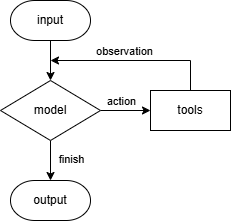
函数create_agent()提供了一个遵循ReAct (Reasoning + Acting)模式的Agent实现。Agent会不断地执行“模型对话-工具调用”循环,直到可以输出最终答案,如下图所示。这种循环使Agent能够处理需要多步操作或依赖外部信息的复杂任务。参见文档Core components - Agents。
invoke()方法返回一个dict,其中包含上述过程的消息列表。运行这个程序,将会看到Agent的思考过程:
1
2
3
4
5
$ python weather_agent.py
human: 北京的天气怎么样?
ai: 我来帮您查询北京的天气情况。
tool: 北京晴天
ai: 根据查询结果,北京目前是晴天。天气状况良好,适合外出活动。
可以看到,这个过程与3.2节末尾提到的“工具调用”类似,但不需要用户参与,完全由Agent自动完成。
4.4 搭建SQL Agent
https://docs.langchain.com/oss/python/langchain/sql-agent
在本节中,将使用LangChain搭建一个能够查询SQL数据库并回答问题的Agent。这个Agent能够
- 从数据库获取可用的表。
- 确定哪些表与问题相关。
- 获取相关表的结构。
- 根据问题和表结构生成SQL查询。
- 使用LLM检查查询中的常见错误。
- 执行查询并返回结果。
- 解决数据库引擎出现的错误,直到查询成功。
- 根据结果生成响应。
注意:执行模型生成的SQL查询存在风险,要确保数据库连接权限尽可能最小化。
环境准备
安装依赖库:
1
pip install langchain langchain-community
选择LLM
选择一个支持工具调用的模型,例如DeepSeek:
1
pip install langchain-deepseek
使用init_chat_model()来初始化模型:
1
2
3
4
5
6
import os
from langchain.chat_models import init_chat_model

os.environ['DEEPSEEK_API_KEY'] = 'sk-...'

model = init_chat_model('deepseek-chat')
或者直接使用ChatDeepSeek:
1
2
3
4
5
6
import os
from langchain_deepseek import ChatDeepSeek

os.environ['DEEPSEEK_API_KEY'] = 'sk-...'

model = ChatDeepSeek(model='deepseek-chat')
配置数据库
本示例使用数字媒体商店示例数据库 chinook,包含艺术家、专辑、顾客、订单等表。下载链接:chinook.zip,解压后得到数据库文件chinook.db。
我们使用langchain_community包中的SQL数据库包装器与数据库进行交互。这个包装器提供了一个简单的接口来执行SQL查询和获取结果:
1
2
3
4
5
6
7
from langchain_community.utilities import SQLDatabase

db = SQLDatabase.from_uri('sqlite:///chinook.db')

print(f'Dialect: {db.dialect}')
print(f'Available tables: {db.get_usable_table_names()}')
print(f'Sample output: {db.run("SELECT * FROM artists LIMIT 5;")}')
1
2
3
Dialect: sqlite
Available tables: ['albums', 'artists', 'customers', 'employees', 'genres', 'invoice_items', 'invoices', 'media_types', 'playlist_track', 'playlists', 'tracks']
Sample output: [(1, 'AC/DC'), (2, 'Accept'), (3, 'Aerosmith'), (4, 'Alanis Morissette'), (5, 'Alice In Chains')]
添加数据库交互工具
使用SQLDatabaseToolkit将上述包装器转换为LLM可调用的工具。
1
2
3
4
5
6
7
from langchain_community.agent_toolkits import SQLDatabaseToolkit

toolkit = SQLDatabaseToolkit(db=db, llm=model)
tools = toolkit.get_tools()

for tool in tools:
    print(f'{tool.name}: {tool.description}')
这个类提供了四个工具:执行SQL查询、查看表结构、列出数据库表和SQL错误检查。
1
2
3
4
sql_db_query: Input to this tool is a detailed and correct SQL query, output is a result from the database. If the query is not correct, an error message will be returned. If an error is returned, rewrite the query, check the query, and try again. If you encounter an issue with Unknown column 'xxxx' in 'field list', use sql_db_schema to query the correct table fields.
sql_db_schema: Input to this tool is a comma-separated list of tables, output is the schema and sample rows for those tables. Be sure that the tables actually exist by calling sql_db_list_tables first! Example Input: table1, table2, table3
sql_db_list_tables: Input is an empty string, output is a comma-separated list of tables in the database.
sql_db_query_checker: Use this tool to double check if your query is correct before executing it. Always use this tool before executing a query with sql_db_query!
创建Agent
使用create_agent()创建一个ReAct Agent。该Agent会分析用户输入并生成SQL命令,之后调用工具来执行。如果SQL有错误,模型会分析错误信息并生成新的命令,直到成功或者达到指定次数。使用有描述性的系统提示(system prompt)来初始化Agent以自定义其行为:
1
2
3
4
5
6
7
8
9
10
11
12
13
14
15
16
17
18
19
20
21
22
23
24
25
26
27
28
29
30
31
32
33
from langchain.agents import create_agent

system_prompt = '''
You are an agent designed to interact with a SQL database.
Given an input question, create a syntactically correct {dialect} query to run,
then look at the results of the query and return the answer. Unless the user
specifies a specific number of examples they wish to obtain, always limit your
query to at most {top_k} results.

You can order the results by a relevant column to return the most interesting
examples in the database. Never query for all the columns from a specific table,
only ask for the relevant columns given the question.

You MUST double check your query before executing it. If you get an error while
executing a query, rewrite the query and try again.

DO NOT make any DML statements (INSERT, UPDATE, DELETE, DROP etc.) to the
database.

To start you should ALWAYS look at the tables in the database to see what you
can query. Do NOT skip this step.

Then you should query the schema of the most relevant tables.
'''.format(
    dialect=db.dialect,
    top_k=5,
)

agent = create_agent(
    model,
    tools,
    system_prompt=system_prompt,
)
运行Agent
用一个示例查询运行Agent并观察其行为:
1
2
3
4
5
6
7
question = 'Which genre on average has the longest tracks?'

for step in agent.stream(
    {'messages': [{'role': 'user', 'content': question}]},
    stream_mode='values',
):
    step['messages'][-1].pretty_print()
输出结果如下:
1
2
3
4
5
6
7
8
9
10
11
12
13
14
15
16
17
18
19
20
21
22
23
24
25
26
27
28
29
30
31
32
33
34
35
36
37
38
39
40
41
42
43
44
45
46
47
48
49
50
51
52
53
54
55
56
57
58
59
60
61
62
63
64
65
66
67
68
69
70
71
72
73
74
75
76
77
78
79
80
81
82
83
84
85
86
87
88
89
90
91
92
93
94
95
96
97
98
99
100
101
102
103
104
105
106
107
108
109
110
111
112
113
114
115
116
117
118
119
120
121
122
123
124
125
126
127
128
129
================================ Human Message =================================

Which genre on average has the longest tracks?
================================== Ai Message ==================================

I'll help you find which genre on average has the longest tracks. Let me start by exploring the database structure.
Tool Calls:
  sql_db_list_tables (call_00_vgi3pYo3o0XwmKyv3AN8na50)
 Call ID: call_00_vgi3pYo3o0XwmKyv3AN8na50
  Args:
    tool_input:
================================= Tool Message =================================
Name: sql_db_list_tables

albums, artists, customers, employees, genres, invoice_items, invoices, media_types, playlist_track, playlists, tracks
================================== Ai Message ==================================

Now let me look at the schema of the relevant tables. I'll need to check the `genres` and `tracks` tables to understand their structure and relationships.
Tool Calls:
  sql_db_schema (call_00_mIljQ24D77kLtaj5ZVpqED28)
 Call ID: call_00_mIljQ24D77kLtaj5ZVpqED28
  Args:
    table_names: genres, tracks
================================= Tool Message =================================
Name: sql_db_schema


CREATE TABLE genres (
        "GenreId" INTEGER NOT NULL,
        "Name" NVARCHAR(120),
        PRIMARY KEY ("GenreId")
)

/*
3 rows from genres table:
GenreId Name
1       Rock
2       Jazz
3       Metal
*/


CREATE TABLE tracks (
        "TrackId" INTEGER NOT NULL,
        "Name" NVARCHAR(200) NOT NULL,
        "AlbumId" INTEGER,
        "MediaTypeId" INTEGER NOT NULL,
        "GenreId" INTEGER,
        "Composer" NVARCHAR(220),
        "Milliseconds" INTEGER NOT NULL,
        "Bytes" INTEGER,
        "UnitPrice" NUMERIC(10, 2) NOT NULL,
        PRIMARY KEY ("TrackId"),
        FOREIGN KEY("MediaTypeId") REFERENCES media_types ("MediaTypeId"),
        FOREIGN KEY("GenreId") REFERENCES genres ("GenreId"),
        FOREIGN KEY("AlbumId") REFERENCES albums ("AlbumId")
)

/*
3 rows from tracks table:
TrackId Name    AlbumId MediaTypeId     GenreId Composer        Milliseconds    Bytes   UnitPrice
1       For Those About To Rock (We Salute You) 1       1       1       Angus Young, Malcolm Young, Brian Johnson       343719  11170334        0.99
2       Balls to the Wall       2       2       1       None    342562  5510424 0.99
3       Fast As a Shark 3       2       1       F. Baltes, S. Kaufman, U. Dirkscneider & W. Hoffman     230619  3990994 0.99
*/
================================== Ai Message ==================================

Perfect! I can see that:
1. The `tracks` table has a `GenreId` column that references the `genres` table
2. The `tracks` table has a `Milliseconds` column which represents the track length
3. The `genres` table has `GenreId` and `Name` columns

I need to:
1. Join the `tracks` and `genres` tables
2. Calculate the average track length (in milliseconds) for each genre
3. Order by average track length in descending order
4. Limit to the top result

Let me first check my query with the query checker:
Tool Calls:
  sql_db_query_checker (call_00_RqIw3RLVEfjru6y9ezR4zBZ1)
 Call ID: call_00_RqIw3RLVEfjru6y9ezR4zBZ1
  Args:
    query: SELECT g.Name AS Genre, ROUND(AVG(t.Milliseconds) / 60000.0, 2) AS AverageTrackLengthMinutes
FROM tracks t
JOIN genres g ON t.GenreId = g.GenreId
GROUP BY g.GenreId, g.Name
ORDER BY AverageTrackLengthMinutes DESC
LIMIT 5
================================= Tool Message =================================
Name: sql_db_query_checker

SELECT g.Name AS Genre, ROUND(AVG(t.Milliseconds) / 60000.0, 2) AS AverageTrackLengthMinutes
FROM tracks t
JOIN genres g ON t.GenreId = g.GenreId
GROUP BY g.GenreId, g.Name
ORDER BY AverageTrackLengthMinutes DESC
LIMIT 5
================================== Ai Message ==================================

The query looks correct. Now let me execute it:
Tool Calls:
  sql_db_query (call_00_aCiwLHVSQvqkNzlp1Xfaz4NI)
 Call ID: call_00_aCiwLHVSQvqkNzlp1Xfaz4NI
  Args:
    query: SELECT g.Name AS Genre, ROUND(AVG(t.Milliseconds) / 60000.0, 2) AS AverageTrackLengthMinutes
FROM tracks t
JOIN genres g ON t.GenreId = g.GenreId
GROUP BY g.GenreId, g.Name
ORDER BY AverageTrackLengthMinutes DESC
LIMIT 5
================================= Tool Message =================================
Name: sql_db_query

[('Sci Fi & Fantasy', 48.53), ('Science Fiction', 43.76), ('Drama', 42.92), ('TV Shows', 35.75), ('Comedy', 26.42)]
================================== Ai Message ==================================

Perfect! Based on the analysis, **the "Sci Fi & Fantasy" genre has the longest tracks on average**, with an average track length of approximately **48.53 minutes**.

Here's the complete answer:

**Answer:** The genre with the longest tracks on average is **"Sci Fi & Fantasy"**, with an average track length of approximately **48.53 minutes**.

The top 5 genres with the longest average track lengths are:
1. Sci Fi & Fantasy - 48.53 minutes
2. Science Fiction - 43.76 minutes
3. Drama - 42.92 minutes
4. TV Shows - 35.75 minutes
5. Comedy - 26.42 minutes
完整代码:sql_agent.py
4.5 进阶:RAG和MCP
本文介绍了如何搭建能够调用本地工具的简单Agent,后续将介绍如何利用RAG和MCP使Agent的功能更加强大。