【Python】基于协程和asyncio的并发编程
协程(coroutine)是Python 3.5中引入的一种实现并发编程的方式。它比线程更轻量级,可以在单个线程内实现多个任务的切换执行。协程可以在执行过程中暂停,并在需要时恢复执行。
本文将介绍Python协程的基本概念和实现原理,以及如何使用async/await语法和标准库asyncio模块编写并发代码。最后使用协程实现一个完整的网络爬虫应用。
1.基本概念
1.1 协程
协程函数(coroutine function)(也称为异步函数(asynchronous function))是一种特殊的函数,可以在执行过程中暂停,并在稍后恢复执行。协程函数通过async def关键字定义,例如:
1
2
3
4
async def hello():
    print('Hello ...')
    await asyncio.sleep(1)
    print('... World!')
调用协程函数不会立即执行函数体,而是创建并返回一个协程对象(coroutine object):
1
2
>>> hello()
<coroutine object hello at 0x000002360C51A980>
要运行协程对象,可以使用asyncio.run()函数。该函数会创建一个事件循环,执行给定的协程对象并返回结果。
1
asyncio.run(hello())
运行该程序,会在控制台打印 “Hello …” ,一秒后再打印 “… World!” 。当然,对于这个Hello World程序来说,使用time.sleep()也可以实现同样的效果。协程真正的强大之处在于:等待一个作业完成的同时可以执行其他作业,并且避免了线程创建和切换的开销。
基于协程的异步程序代码框架如下:
1
2
3
4
5
6
7
8
import asyncio

async def main():
    # Perform asynchronous instructions
    ...

if __name__ == '__main__':
    asyncio.run(main())  # Block until the coroutine main() finishes
注意:术语“协程函数”和“协程对象”经常被统称为“协程”,这可能会引起混淆。在本文中,“协程”特指协程对象。
协程可以在函数体的不同位置暂停和恢复,这使得异步行为成为可能。稍后将介绍如何实现这种异步行为。
1.2 事件循环
事件循环(event loop)是asyncio的核心组件,负责调度和执行协程。事件循环包含一个待运行作业的“队列”,每次从队列中取出一个作业并给予它控制权,然后该作业就会运行。一旦该作业暂停或完成,就把控制权返回给事件循环,然后事件循环会选择另一个作业。这个过程将无限重复。(可以把事件循环大致类比为线程池的调度线程。)
asyncio.run()函数会自动创建一个新的事件循环来运行给定的协程。也可以使用asyncio.new_event_loop()函数手动创建事件循环。同一个线程中不能同时运行两个事件循环。
异步程序的高效执行依赖于作业之间的共享和合作。如果一个作业长时间独占控制权,会让其他作业陷入饥饿,从而使整个事件循环机制毫无用处。
1.3 任务
任务(task)是对协程的包装,用于在事件循环中运行协程。可以通过asyncio.create_task()函数创建任务,该函数会自动调度给定协程的执行,返回一个asyncio.Task对象。不应该手动创建任务对象。
1
hello_task = asyncio.create_task(hello())
可以在其他协程中使用await表达式等待任务执行完成(将在下一节介绍)。如果协程等待一个任务则会暂停执行(此时事件循环可以执行其他协程);当任务完成时,该协程将恢复执行。例如:
1
2
3
async def main():
    hello_task = asyncio.create_task(hello())
    await hello_task
可以将这个过程类比为向线程池中提交一个作业并返回一个future对象,通过该对象等待作业完成并返回结果:
1
2
3
with ThreadPoolExecutor() as executor:
    future = executor.submit(my_job)
    res = future.result()
事件循环相当于线程池,协程相当于提交的作业,任务相当于future(实际上,任务就是一种future对象,asyncio.Task继承了asyncio.Future类)。
任务还维护了一个回调函数列表,其重要性将在下一节中讨论。需要注意的是,任务本身不会被添加到事件循环中,只有任务的回调函数才会。
如果创建的任务对象在被事件循环调用之前就被垃圾回收了,这可能会产生问题。例如:
1
2
3
4
async def main():
    asyncio.create_task(hello())
    # Other asynchronous instructions which run for a while and cede control to the event loop...
    ...
当事件循环最终尝试运行该任务时,可能会失败并发现该任务对象不存在。为了避免这一问题,应该使用变量引用asyncio.create_task()返回的对象。
要取消任务,可以调用cancel()方法。当任务被取消时,会引发asyncio.CancelledError异常。协程函数应该使用try块执行清理逻辑并重新引发该异常。例如:
1
2
3
4
5
6
7
8
9
10
11
12
13
14
15
16
17
18
import asyncio

async def hello():
    try:
        print('Hello ...')
        await asyncio.sleep(100)
        print('... World!')
    except asyncio.CancelledError:
        print('Task cancelled')
        # perform clean-up logic
        raise  # propagate CancelledError

async def main():
    hello_task = asyncio.create_task(hello())
    await asyncio.sleep(1)
    hello_task.cancel()

asyncio.run(main())
1.4 可等待对象和await表达式
可等待(awaitable)对象是提供了__await__()方法的对象,该方法必须返回一个迭代器,用于实现控制权转移(将在2.1节中介绍)。主要有三类可等待对象:协程、任务和future。
关键字await用于暂停当前协程的执行,以等待一个可等待对象执行完成并返回结果。表达式await obj会调用obj.__await__()方法,只能在协程函数内部使用。
await的行为取决于被等待对象的类型:
- 等待任务(或future)会将控制权从当前协程交还给事件循环。
- 等待协程不会将控制权交还给事件循环。
再考虑上一节中的示例:
1
2
3
async def main():
    hello_task = asyncio.create_task(hello())
    await hello_task
假设事件循环已经将控制权交给了协程main()。await hello_task这条语句会向hello_task对象的回调函数列表中添加一个回调函数(用于恢复main()的执行),随后将控制权交还给事件循环。一段时间后,事件循环会将控制权交给hello_task,该任务会完成其工作(执行协程hello())。当该任务结束时,会将其回调函数添加到事件循环中(在这里是恢复main()的执行)。
一般来说,当被等待的任务完成时,原先的协程将被添加回事件循环以便恢复运行。这是一个基本但可靠的思维模型。
与任务不同,等待协程并不会将控制权交还给事件循环。await coroutine的行为实际上与调用普通函数相同。不过,如果一个协程等待另一个协程,该协程又等待一个任务或future,那么这两个协程都会暂停,控制权仍然会交还给事件循环。
考虑下面的程序:
1
2
3
4
5
6
7
8
9
10
11
12
13
14
15
16
import asyncio

async def coro_a():
    print("I am coro_a(). Hi!")

async def coro_b():
    print("I am coro_b(). I sure hope no one hogs the event loop...")

async def main():
    task_b = asyncio.create_task(coro_b())
    num_repeats = 3
    for _ in range(num_repeats):
        await coro_a()
    await task_b

asyncio.run(main())
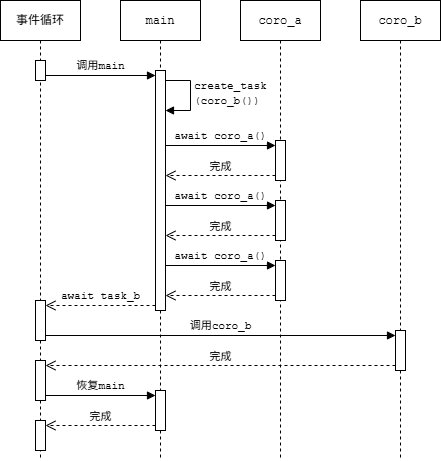
协程main()中的第一条语句创建了task_b并通过事件循环调度其执行。然后重复地等待coro_a(),在这个过程中控制权从未交还给事件循环。直到执行await task_b才会暂停main()的执行,然后事件循环才会切换到coro_b()。程序的输出如下:
1
2
3
4
I am coro_a(). Hi!
I am coro_a(). Hi!
I am coro_a(). Hi!
I am coro_b(). I sure hope no one hogs the event loop...
在这个示例中,控制权转移过程如下图所示。
如果将await coro_a()改为await asyncio.create_task(coro_a()),行为就会发生变化。协程main()会通过该语句将控制权交还给事件循环。然后事件循环会继续处理待执行的作业,先调用task_b,然后调用包装coro_a()的任务,最后恢复协程main()。
1
2
3
4
I am coro_b(). I sure hope no one hogs the event loop...
I am coro_a(). Hi!
I am coro_a(). Hi!
I am coro_a(). Hi!
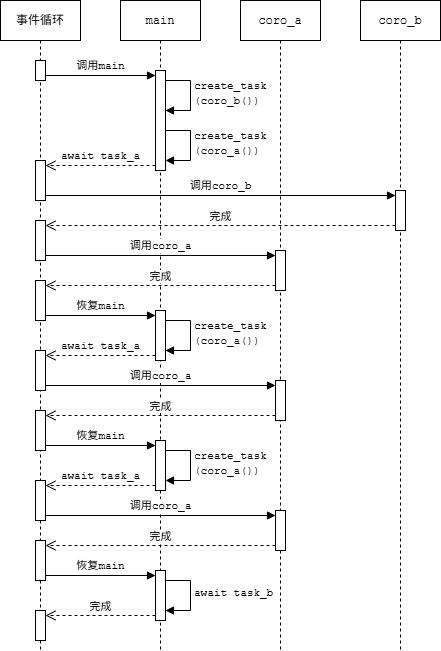
这个例子说明了仅使用await coroutine可能会独占控制权并阻滞事件循环。asyncio.run()可以通过关键字参数debug=True来检测这种情况,这将启用调试模式。
1.5 异步迭代器和async for语句
异步迭代器(asynchronous iterator)是提供了__anext__()方法的对象。该方法可以调用异步代码,必须返回一个可等待对象(例如返回一个future,或者直接使用async def定义以返回协程对象),其结果是迭代器的下一个值,当迭代结束时应该引发StopAsyncIteration。内置函数anext(ait)等价于ait.__anext__()。
异步可迭代对象(asynchronous iterable)是提供了__aiter__()方法的对象,该方法必须返回一个异步迭代器。异步迭代器也是异步可迭代对象,其__aiter__()方法返回自身。异步可迭代对象可以用于async for语句。
下面是一个异步迭代器的示例:
1
2
3
4
5
6
7
8
9
10
11
12
13
14
15
class DelayedCounter:

    def __init__(self, end, delay=1):
        self.end = end
        self.delay = delay
        self.value = -1

    def __aiter__(self):
        return self

    async def __anext__(self):
        self.value += 1
        if self.value >= self.end:
            raise StopAsyncIteration
        return await asyncio.sleep(self.delay, result=self.value)
这个迭代器会生成整数序列0~end-1,两个值之间间隔指定的秒数。也可以将__anext__定义为普通方法,直接返回协程对象asyncio.sleep():
1
2
3
4
5
def __anext__(self):
    self.value += 1
    if self.value >= self.end:
        raise StopAsyncIteration
    return asyncio.sleep(self.delay, result=self.value)
异步生成器是使用async def定义且包含yield语句的函数或方法。调用它会返回一个异步迭代器对象。例如,上面的DelayedCounter可以改写成等价的异步生成器:
1
2
3
async def delayed_counter(end, delay=1):
    for value in range(end):
        yield await asyncio.sleep(delay, result=value)
async for语句可以方便地对异步可迭代对象进行迭代,只能在协程函数内使用。语法如下:
1
2
async for target in expr:
    block
在语义上大致等价于
1
2
3
4
5
6
7
it = expr.__aiter__()
while True:
    try:
        target = await it.__anext__()
        block
    except StopAsyncIteration:
        break
例如:
1
2
3
4
5
async def main():
    counter = DelayedCounter(10, delay=1)
    # print 0~9, one value per second
    async for value in counter:
        print(value)
1.6 异步上下文管理器和async with语句
异步上下文管理器(asynchronous context manager)是提供了__aenter__()和__aexit__()方法的对象,这两个方法必须返回一个可等待对象。异步上下文管理器可以用于async with语句。
async with语句的语法如下:
1
2
async with expr as target:
    block
在语义上大致等价于
1
2
3
4
5
6
7
8
9
10
11
12
13
manager = expr
hit_except = False

try:
    target = await manager.__aenter__()
    block
except:
    hit_except = True
    if not await manager.__aexit__(*sys.exc_info()):
        raise
finally:
    if not hit_except:
        await manager.__aexit__(None, None, None)
async with语句只能在协程函数内使用。
2.工作原理
本节将介绍协程的控制权转移机制的工作原理,以及如何自定义异步运算符。
2.1 控制权转移
前面已经提到,可等待对象的__await__()方法返回一个迭代器,协程的执行可以通过这个迭代器来控制。协程对象具有以下与控制执行相关的方法(类似于生成器方法,详见《Python基础教程》笔记 第9章 9.7.4节):
send(value):开始或恢复协程的执行。如果协程是首次执行,value必须为None;如果是恢复执行,则value将作为使协程暂停的(可等待对象的__await__()方法中)yield语句的返回值。该方法返回下一个yield语句产生的值,如果协程结束则引发StopIteration异常,并将返回值保存在其value属性中(如果有)。throw(exc):在协程内引发指定的异常。如果该异常未在协程内被捕获,则传播给调用者。close():使协程清理并退出。
假设coro是一个协程对象,obj是一个可等待对象,控制协程执行的各个阶段及转移控制权的方式如下:
- 开始:调用
coro.send(None),将控制权交给协程coro。 - 暂停:在协程内调用
await obj→ 调用obj.__await__(),执行到yield value→ 沿着调用链向上传播 →coro.send(None)返回value,控制权交还给调用者。 - 恢复:调用
coro.send(value2),将控制权交给协程coro→obj.__await__()方法中的yield value语句返回value2,执行到return value3→ 协程中的await obj返回value3→ 协程继续执行。 - 结束:协程执行完成,返回
value4→coro.send(value2)抛出StopIteration(value4),控制权交还给调用者。
下面看一个例子,这个程序手动模拟了一个简单的事件循环:
1
2
3
4
5
6
7
8
9
10
11
12
13
14
15
16
17
18
19
20
21
22
23
24
class Rock:
    def __await__(self):
        value_sent_in = yield 7
        print(f"Rock.__await__ resuming with value: {value_sent_in}.")
        return value_sent_in

async def main():
    print("Beginning coroutine main().")
    rock = Rock()
    print("Awaiting rock...")
    value_from_rock = await rock
    print(f"Coroutine received value: {value_from_rock} from rock.")
    return 23

coroutine = main()
intermediate_result = coroutine.send(None)
print(f"Coroutine paused and returned intermediate value: {intermediate_result}.")

print(f"Resuming coroutine and sending in value: 42.")
try:
    coroutine.send(42)
except StopIteration as e:
    returned_value = e.value
    print(f"Coroutine main() finished and provided value: {returned_value}.")
这个程序的执行过程如下:
- 第15行:调用协程函数
main(),创建协程对象coroutine。 - 第16行:对协程对象调用
send(None),将控制权交给协程,协程开始执行。 - 第11行:等待
rock对象,调用其__await__()方法。 - 第3行:语句
yield 7暂停当前协程的执行,并沿着调用链向上传播。 - 第16行:
send(None)返回,并将intermediate_result赋值为7(第3行yield语句的参数),控制权交还给主程序。 - 第21行:对协程对象调用
send(42),将控制权交给协程,协程恢复执行。 - 第3行:
yield语句返回,并将value_sent_in赋值为42(第21行send()方法的参数)。 - 第5行:
__await__()方法返回42。 - 第11行:
await rock返回,并将value_from_rock赋值为42(第5行__await__()方法的返回值),协程继续执行。 - 第13行:协程执行完成,返回23。
- 第23行:
send(42)引发StopIteration异常,其value属性为23(第13行协程函数的返回值),将其赋值给returned_value,控制权交还给主程序。
程序将产生以下输出:
1
2
3
4
5
6
7
Beginning coroutine main().
Awaiting rock...
Coroutine paused and returned intermediate value: 7.
Resuming coroutine and sending in value: 42.
Rock.__await__ resuming with value: 42.
Coroutine received value: 42 from rock.
Coroutine main() finished and provided value: 23.
注:
Rock.__await__()实际上就是一个普通的生成器函数。协程对象的send()、throw()和close()方法会委托给这个生成器的相应方法。__await__()方法可以包含多个yield语句。await表达式会调用被等待对象的__await__()方法获得一个生成器,每次调用协程对象的send()方法都会消费一个值,期间协程一直暂停在await,直到迭代结束协程才会继续执行。- 自定义可等待对象的
__await__()方法应该遵循这一规则:当等待的条件不满足时yield,当条件满足时返回。“等待的条件”取决于可等待对象的语义,示例见2.3节。 - 虽然文档中只要求
__await__()方法返回一个迭代器,但实际上必须是生成器。如果将上面程序中的Rock.__await__()方法改为返回iter([7]),await rock会引发异常 “AttributeError: ‘list_iterator’ object has no attribute ‘send’” 。
2.2 Future
Future对象表示异步计算的结果(“可以在未来某个时间点获取的结果”)。Future对象有几个重要属性。一个是状态,可以是待处理(pending)、已取消(cancelled)或已完成(done)。另一个是结果,当状态为已完成时可以获取结果。
asyncio.Task继承了asyncio.Future。1.3节中提到的任务的回调函数列表实际上继承自Future类。
asyncio.Future的API类似于concurrent.futures.Future,但前者用于协程,而后者用于线程和进程。可以使用set_result()方法设置结果并将future标记为已完成,或者使用set_exception()方法设置异常。result()方法返回future的结果或引发设置的异常。done()和cancelled()检查future的状态是否是已完成或已取消。
Future是可等待对象,协程可以等待future对象直到完成或取消。一个future可被多次等待,最终结果相同。
Future对象是与事件循环绑定的,默认为当前正在运行的事件循环(asyncio.get_running_loop()),可以在构造函数中通过关键字参数loop指定事件循环。也可以通过事件循环对象的create_future()方法创建future对象。
Future通常用于实现底层API和高层API的交互。经验法则是永远不要在面向用户的API中暴露future对象。
源代码解析
前面提到过,协程、任务和future都是可等待对象。下面通过Python源代码解析各自的实现原理。
(1)Future
asyncio.Future类的__await__()方法简化的定义如下(源代码见Lib/asyncio/futures.py#L292):
1
2
3
4
def __await__(self):
    if not self.done():
        yield self
    return self.result()
可以看到,等待一个future会检查其状态:如果状态是已完成则直接返回结果,否则yield使协程暂停,后续恢复时再获取结果(只有当future已完成时事件循环才会恢复那些等待它的协程)。也就是说,future等待的条件是状态变为已完成。
(2)任务
Future通常由其他协程调用set_result()来转入已完成状态,而任务在其包装的协程结束时将自己标记为已完成。asyncio.Task类的核心方法是__step(),简化的定义如下(源代码见Lib/asyncio/tasks.py#L266):
1
2
3
4
5
6
7
8
9
10
11
12
13
14
15
16
17
18
19
20
class Task(Future):

    def __init__(self, coro, loop=None):
        super().__init__(loop=loop)
        self._coro = coro
        loop.call_soon(self.__step)

    def __step(self):
        try:
            future = self._coro.send(None)
        except StopIteration as e:
            # coroutine finished
            super().set_result(e.value)
        except CancelledError:
            super().cancel()
        except BaseException as e:
            super().set_exception(e)
        else:
            # coroutine still awaiting future
            future.add_done_callback(self.__step)
__step()方法的核心逻辑如下:
- 对包装的协程
self._coro调用send(None),使其开始或恢复执行。 - 如果协程等待一个future对象,则
send()返回这个对象(上面已经看到Future.__await__()方法会yield自身),并在else子句中将self.__step添加到其回调函数列表。 - 如果协程等待的future已完成,会通过其回调函数再次调用
__step()方法。 - 如果协程执行结束,则
send()会引发StopIteration,此时调用set_result()将结果设置为协程的返回值,并将自己标记为已完成。 - 如果任务被取消,则调用
cancel()。 - 如果发生其他异常,则调用
set_exception(),同样将自己标记为已完成。
Task直接继承了Future类的__await__()方法。因此,任务等待的条件是包装的协程执行结束。
(3)协程
Python的await关键字针对协程做了特殊优化,对应的C函数如下(源代码见Python/ceval.c#L3944):
1
2
3
4
5
6
7
PyObject *
_PyEval_GetAwaitable(PyObject *iterable, int oparg)
{
    PyObject *iter = _PyCoro_GetAwaitableIter(iterable);
    ...
    return iter;
}
其中调用的_PyCoro_GetAwaitableIter()函数返回给定对象的“可等待迭代器”(源代码见Objects/genobject.c#L1067):
1
2
3
4
5
6
7
8
9
10
11
12
13
14
15
16
17
18
19
20
21
22
23
24
25
26
27
28
29
30
31
32
33
34
35
36
37
38
39
40
41
42
43
44
/*
 *   This helper function returns an awaitable for `o`:
 *     - `o` if `o` is a coroutine-object;
 *     - `type(o)->tp_as_async->am_await(o)`
 *
 *   Raises a TypeError if it's not possible to return
 *   an awaitable and returns NULL.
 */
PyObject *
_PyCoro_GetAwaitableIter(PyObject *o)
{
    unaryfunc getter = NULL;
    PyTypeObject *ot;

    if (PyCoro_CheckExact(o) || gen_is_coroutine(o)) {
        /* 'o' is a coroutine. */
        return Py_NewRef(o);
    }

    ot = Py_TYPE(o);
    if (ot->tp_as_async != NULL) {
        getter = ot->tp_as_async->am_await;
    }
    if (getter != NULL) {
        PyObject *res = (*getter)(o);
        if (res != NULL) {
            if (PyCoro_CheckExact(res) || gen_is_coroutine(res)) {
                /* __await__ must return an *iterator*, not
                   a coroutine or another awaitable (see PEP 492) */
                PyErr_SetString(PyExc_TypeError, "__await__() returned a coroutine");
                Py_CLEAR(res);
            } else if (!PyIter_Check(res)) {
                PyErr_Format(PyExc_TypeError,
                             "__await__() returned non-iterator of type '%.100s'",
                             Py_TYPE(res)->tp_name);
                Py_CLEAR(res);
            }
        }
        return res;
    }

    PyErr_Format(PyExc_TypeError, "'%.100s' object can't be awaited", ot->tp_name);
    return NULL;
}
- 如果
o是一个协程对象,则直接返回它本身。 - 否则调用其
__await__()方法(对应函数指针ot->tp_as_async->am_await),如果返回的不是一个迭代器则引发TypeError。
也就是说,当await一个协程时,解释器直接把协程对象当作“迭代器”,调用其send()方法就是调用协程对象本身的send()方法。在这个过程中不存在yield,因此不会使当前协程暂停。
另外,PEP 492要求可等待对象的__await__()方法返回一个迭代器。为了保持语义兼容,协程对象也有__await__()方法(源代码见Objects/genobject.c#L1116):
1
2
3
4
5
6
7
static PyObject *
coro_await(PyObject *coro)
{
    PyCoroWrapper *cw = PyObject_GC_New(PyCoroWrapper, &_PyCoroWrapper_Type);
    cw->cw_coroutine = (PyCoroObject*)Py_NewRef(coro);
    return (PyObject *)cw;
}
该方法创建并返回了一个协程包装器类型(PyCoroWrapper)的对象。包装器对象也有send()、throw()和close()方法,分别直接调用底层协程的对应方法。另外,包装器对象实现了迭代器协议,其__next__()方法等价于send(None)(源代码见Objects/genobject.c#L1282):
1
2
3
4
5
6
7
8
9
10
11
12
13
static PyObject *
coro_wrapper_iternext(PyObject *self)
{
    PyCoroWrapper *cw = _PyCoroWrapper_CAST(self);
    return gen_iternext((PyObject *)cw->cw_coroutine);
}

static PyObject *
coro_wrapper_send(PyObject *self, PyObject *arg)
{
    PyCoroWrapper *cw = _PyCoroWrapper_CAST(self);
    return gen_send((PyObject *)cw->cw_coroutine, arg);
}
其中,gen_send()对应生成器/协程对象的send()方法,gen_iternext()对应生成器的__next__()方法(等价于gen_send(obj, NULL))。因此,显式调用协程对象的__await__()并对返回的对象调用send()方法也等价于调用协程对象本身的send()方法。由于协程的__await__()方法不包含yield,同样不会使当前协程暂停。
1
2
3
4
5
6
7
8
9
10
11
12
13
>>> async def hello():
...     print('Hello')
...
>>> coro = hello()
>>> wrapper = coro.__await__()
>>> wrapper
<coroutine_wrapper object at 0x000001DCB4E2EF50>
>>> wrapper.send(None)
Hello
Traceback (most recent call last):
  File "<pyshell#6>", line 1, in <module>
    wrapper.send(None)
StopIteration
小结
await future:暂停当前协程,等待future的状态变为已完成,返回future的结果。await task:暂停当前协程,等待任务包装的协程执行结束,返回该协程的返回值。await coroutine:不暂停当前协程,直接调用另一个协程,返回该协程的返回值。
2.3 实现asyncio.sleep()
本节通过一个例子来说明如何利用future自己实现异步休眠功能(类似于asyncio.sleep())。
asyncio.sleep()函数的作用是使当前协程暂停指定的秒数,同时不影响其他协程的运行。在协程中通过await asyncio.sleep(n)放弃控制权,并在(至少)n秒后重新获得控制权。
例如,协程display_date()每秒显示一次当前日期时间,持续5秒(间隔并非精确的1秒):
1
2
3
4
5
6
7
8
9
10
11
12
13
import asyncio
import datetime

async def display_date():
    loop = asyncio.get_running_loop()
    end_time = loop.time() + 5
    while True:
        print(datetime.datetime.now())
        if loop.time() + 1 >= end_time:
            break
        await asyncio.sleep(1)

asyncio.run(display_date())
使协程放弃控制权的唯一方式是await一个在其__await__()方法中yield的对象。换句话说,需要实现这样一个可等待对象:其__await__()方法在指定的结束时间之前始终yield(即使事件循环恢复当前协程也立即放弃控制权);到达结束时间后立即返回,使当前协程可以继续执行。
下面的AsyncSleep类实现了这个功能:
1
2
3
4
5
6
7
8
class AsyncSleep:
    def __init__(self, seconds):
        self.seconds = seconds

    def __await__(self):
        time_to_wake = time.time() + self.seconds
        while time.time() < time_to_wake:
            yield
现在将上面示例程序中的await asyncio.sleep(1)替换为await AsyncSleep(1)也可以实现同样的效果。
另外,也可以使用future实现:
1
2
3
4
5
6
7
8
9
10
11
12
13
14
15
16
17
async def async_sleep(seconds):
    future = asyncio.Future()
    time_to_wake = time.time() + seconds
    # Add the watcher-task to the event loop.
    watcher_task = asyncio.create_task(_sleep_watcher(future, time_to_wake))
    # Block until the future is marked as done.
    await future

async def _sleep_watcher(future, time_to_wake):
    while time.time() < time_to_wake:
        await YieldToEventLoop()
    # This marks the future as done.
    future.set_result(None)

class YieldToEventLoop:
    def __await__(self):
        yield
运行协程_sleep_watcher()的任务watcher_task会在事件循环的每个完整周期中被调用一次。每次恢复时检查时间,如果还未经过足够的时间,则再次暂停并将控制权交还给事件循环。一旦经过了足够的时间,_sleep_watcher()会退出无限循环并将future标记为已完成。由于这个辅助任务在事件循环的每个周期中只会被调用一次,因此这个异步休眠会休眠至少一秒,而不是恰好一秒。asyncio.sleep()也是如此。
这个示例也可以不用future实现,如下所示:
1
2
3
4
async def async_sleep(seconds):
    time_to_wake = time.time() + seconds
    while time.time() < time_to_wake:
        await YieldToEventLoop()
标准库asyncio.sleep()是基于future实现的,简化的定义如下(源代码见Lib/asyncio/tasks.py#L687):
1
2
3
4
5
async def sleep(seconds):
    loop = asyncio.get_running_loop()
    future = loop.create_future()
    loop.call_later(seconds, asyncio.Future.set_result, future, None)
    await future
loop.call_later()方法会使事件循环在指定的秒数后调用给定的函数。这种方式比前面几种实现的优势在于避免了不必要的恢复。
3.asyncio模块
Python标准库模块asyncio是用于编写异步代码的库,特别适合于I/O密集型操作以及构建高性能异步框架,例如网络请求、Web服务器、数据库连接、实时消息队列处理等。
官方文档:https://docs.python.org/3/library/asyncio.html
asyncio模块提供了一组高层级API,例如:
此外,还有一些为库和框架开发者提供的低层级API,例如:
3.1 运行协程
| 函数 | 描述 | 示例 |
|---|---|---|
run(coro) | 运行一个协程 | asyncio.run(main()) |
create_task(coro) | 创建一个任务来调度协程执行 | task = asyncio.create_task(fetch_data()) |
gather(*aws) | 并发运行多个任务 | await asyncio.gather(task1, task2) |
sleep(delay, result=None) | 异步休眠 | await asyncio.sleep(1) |
wait_for(aw, timeout) | 带超时的等待 | await asyncio.wait_for(long_task, timeout=5) |
to_thread(func, *args) | 在单独的线程中运行函数 | await asyncio.to_thread(blocking_io, arg1, arg2) |
示例:
1
2
3
4
5
6
7
8
9
10
11
12
13
14
15
16
17
18
19
20
21
import asyncio

async def factorial(name, number):
    f = 1
    for i in range(2, number + 1):
        print(f"Task {name}: Compute factorial({number}), currently i={i}...")
        await asyncio.sleep(1)
        f *= i
    print(f"Task {name}: factorial({number}) = {f}")
    return f

async def main():
    # Schedule three calls *concurrently*:
    results = await asyncio.gather(
        factorial("A", 2),
        factorial("B", 3),
        factorial("C", 4),
    )
    print(results)

asyncio.run(main())
程序的输出如下:
1
2
3
4
5
6
7
8
9
10
Task A: Compute factorial(2), currently i=2...
Task B: Compute factorial(3), currently i=2...
Task C: Compute factorial(4), currently i=2...
Task A: factorial(2) = 2
Task B: Compute factorial(3), currently i=3...
Task C: Compute factorial(4), currently i=3...
Task B: factorial(3) = 6
Task C: Compute factorial(4), currently i=4...
Task C: factorial(4) = 24
[2, 6, 24]
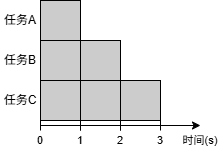
在这个示例中,任务A、B、C同时运行,总运行时间约为3 s(如下图所示)。
假设tasks是一个任务对象的列表,await asyncio.gather(*tasks)的效果等价于[await task for task in tasks]。如果直接向gather()传递协程对象,会自动创建一个任务对其进行包装。因此上面的main()函数等价于
1
2
3
4
5
6
7
8
async def main():
    tasks = [
        asyncio.create_task(factorial("A", 2)),
        asyncio.create_task(factorial("B", 3)),
        asyncio.create_task(factorial("C", 4)),
    ]
    results = [await task for task in tasks]
    print(results)
3.2 网络I/O
| 函数 | 描述 | 示例 |
|---|---|---|
open_connection(host, port) | 建立TCP连接 | reader, writer = await asyncio.open_connection('127.0.0.1', 8888) |
start_server(cb, host, port) | 启动TCP服务器 | server = await asyncio.start_server(handle_echo, '0.0.0.0', 8888) |
例如,使用open_connection()实现的TCP echo客户端:
1
2
3
4
5
6
7
8
9
10
11
12
13
14
15
16
17
import asyncio

async def tcp_echo_client(message):
    reader, writer = await asyncio.open_connection('127.0.0.1', 8888)

    print(f'Send: {message!r}')
    writer.write(message.encode())
    await writer.drain()

    data = await reader.read(100)
    print(f'Received: {data.decode()!r}')

    print('Close the connection')
    writer.close()
    await writer.wait_closed()

asyncio.run(tcp_echo_client('Hello World!'))
使用start_server()实现的TCP echo服务器:
1
2
3
4
5
6
7
8
9
10
11
12
13
14
15
16
17
18
19
20
21
22
23
24
25
26
27
import asyncio

async def handle_echo(reader, writer):
    data = await reader.read(100)
    message = data.decode()
    addr = writer.get_extra_info('peername')

    print(f"Received {message!r} from {addr!r}")

    print(f"Send: {message!r}")
    writer.write(data)
    await writer.drain()

    print("Close the connection")
    writer.close()
    await writer.wait_closed()

async def main():
    server = await asyncio.start_server(handle_echo, '0.0.0.0', 8888)

    addrs = ', '.join(str(sock.getsockname()) for sock in server.sockets)
    print(f'Serving on {addrs}')

    async with server:
        await server.serve_forever()

asyncio.run(main())
3.3 子进程
| 函数 | 描述 | 示例 |
|---|---|---|
create_subprocess_exec(prog, *args) | 创建子进程 | proc = await asyncio.create_subprocess_exec('python', '-V') |
create_subprocess_shell(cmd) | 运行shell命令 | proc = await asyncio.create_subprocess_shell('ls -l') |
这两个函数都返回一个asyncio.subprocess.Process对象用于控制子进程,使用StreamReader类读取其标准输出。
例如,下面的程序使用create_subprocess_exec()函数在子进程中调用python -c命令执行Python代码,打印当前日期:
1
2
3
4
5
6
7
8
9
10
11
12
13
14
15
16
17
18
19
20
21
import asyncio
import sys

async def get_date():
    code = 'import datetime; print(datetime.datetime.now())'

    # Create the subprocess; redirect the standard output into a pipe.
    proc = await asyncio.create_subprocess_exec(
        sys.executable, '-c', code,
        stdout=asyncio.subprocess.PIPE)

    # Read one line of output.
    data = await proc.stdout.readline()
    line = data.decode().rstrip()

    # Wait for the subprocess exit.
    await proc.wait()
    return line

date = asyncio.run(get_date())
print(f"Current date: {date}")
3.4 队列
asyncio.Queue的API类似于queue.Queue,但前者用于协程,而后者用于线程。
队列可用于在多个协程之间分配工作,实现连接池以及发布/订阅模式或生产者/消费者模式。下面的程序使用队列向多个并发的协程分配工作:
1
2
3
4
5
6
7
8
9
10
11
12
13
14
15
16
17
18
19
20
21
22
23
24
25
26
27
28
29
30
31
32
33
34
35
36
37
38
39
40
41
42
43
44
45
46
47
48
49
50
51
52
53
import asyncio
import random
import time


async def worker(name, queue):
    while True:
        # Get a "work item" out of the queue.
        sleep_for = await queue.get()

        # Sleep for the "sleep_for" seconds.
        await asyncio.sleep(sleep_for)

        # Notify the queue that the "work item" has been processed.
        queue.task_done()

        print(f'{name} has slept for {sleep_for:.2f} seconds')


async def main():
    # Create a queue that we will use to store our "workload".
    queue = asyncio.Queue()

    # Generate random timings and put them into the queue.
    total_sleep_time = 0
    for _ in range(20):
        sleep_for = random.uniform(0.05, 1.0)
        total_sleep_time += sleep_for
        queue.put_nowait(sleep_for)

    # Create three worker tasks to process the queue concurrently.
    tasks = []
    for i in range(3):
        task = asyncio.create_task(worker(f'worker-{i}', queue))
        tasks.append(task)

    # Wait until the queue is fully processed.
    started_at = time.monotonic()
    await queue.join()
    total_slept_for = time.monotonic() - started_at

    # Cancel our worker tasks.
    for task in tasks:
        task.cancel()
    # Wait until all worker tasks are cancelled.
    await asyncio.gather(*tasks, return_exceptions=True)

    print('====')
    print(f'3 workers slept in parallel for {total_slept_for:.2f} seconds')
    print(f'total expected sleep time: {total_sleep_time:.2f} seconds')


asyncio.run(main())
这个示例使用sleep()模拟工作耗时,一次运行的输出如下。可以看到,所有任务需要的总耗时为10.72 s,而3个协程并发执行这些任务只用了3.94 s。
1
2
3 workers slept in parallel for 3.94 seconds
total expected sleep time: 10.72 seconds
3.5 同步原语
| 类 | 描述 | 示例 |
|---|---|---|
Lock | 互斥锁 | 创建:lock = asyncio.Lock()加锁: async with lock: |
Event | 事件通知 | 创建:event = asyncio.Event()等待者: await event.wait()通知者: event.set() |
Condition | 条件变量 | 创建:cond = asyncio.Condition()等待者: async with cond: await cond.wait()通知者: async with cond: cond.notify() |
Semaphore | 信号量 | 创建:sem = asyncio.Semaphore(10)使用: async with sem: |
这些同步原语与threading模块中的类似。有些类是异步上下文管理器,可以通过async with语句使用。例如:
1
2
3
4
5
lock = asyncio.Lock()

# ... later
async with lock:
    # access shared state
等价于
1
2
3
4
5
6
7
8
lock = asyncio.Lock()

# ... later
await lock.acquire()
try:
    # access shared state
finally:
    lock.release()
3.6 事件循环
| 函数 | 描述 |
|---|---|
get_running_loop() | 获取当前运行的事件循环 |
new_event_loop() | 创建一个新的事件循环 |
事件循环的主要方法:
| 方法 | 描述 | 示例 |
|---|---|---|
run_until_complete(future) | 运行可等待对象直到完成 | loop.run_until_complete(main()) |
run_forever() | 永久运行事件循环(直到调用stop()) | |
stop() | 停止事件循环 | |
close() | 关闭事件循环 | |
call_soon(func, *args) | 尽快调用函数 | loop.call_soon(print, 'Hello') |
call_later(delay, func, *args) | 在delay秒后调用函数 | loop.call_later(5, print, 'Hello') |
call_at(when, func, *args) | 在绝对时间戳when调用函数 | loop.call_at(loop.time() + 5, print, 'Hello') |
create_future() | 创建一个附加到事件循环的future对象 | |
create_task(coro) | 创建一个任务对象,将协程加入事件循环 | |
run_in_executor(executor, func, *args) | 在线程池或进程池中运行函数 | Executing code in thread or process pools |
asyncio.run()函数底层就是使用get_running_loop()、loop.create_task()和loop.run_until_complete()实现的。
3.7 第三方库
有很多基于asyncio构建的异步I/O库,参见 https://github.com/timofurrer/awesome-asyncio 。
4.最佳实践
- 不要阻塞事件循环,例如在协程中调用
time.sleep()或耗时的同步操作。 - 尽量使用原生支持异步的库(如aiohttp)。如果必须使用同步库(如requests),则使用
to_thread()或loop.run_in_executor()在线程池中执行。 asyncio仅适用于I/O密集型操作(由于GIL)。对于CPU密集型操作,使用loop.run_in_executor()在进程池中执行。
5.实践:网络爬虫
最后,使用asyncio以及aiohttp和aiofiles库编写一个网络爬虫程序。
aiohttp是一个异步HTTP库。与requests不同,这个库提供的API都是异步的(例如发送HTTP请求和获取响应体),可以和asyncio模块一起使用。
aiofiles是一个异步文件操作库,提供了与标准库类似的文件API,并支持async/await语法。
使用以下命令安装这两个库:
1
pip install aiohttp aiofiles
下面的程序从 http://quotes.toscrape.com/ 爬取名人语录并保存到文件。
async_quotes_crawler.py
1
2
3
4
5
6
7
8
9
10
11
12
13
14
15
16
17
18
19
20
21
22
23
24
25
26
27
28
29
30
31
32
33
34
35
36
37
38
39
40
41
42
43
44
45
46
import asyncio
import re
import time

import aiofiles
import aiohttp


def parse(text):
    quote_pattern = re.compile(r'<span class="text" itemprop="text">(.+?)</span>')
    author_pattern = re.compile(r'<small class="author" itemprop="author">(.+?)</small>')
    quotes = quote_pattern.findall(text)
    authors = author_pattern.findall(text)
    return list(zip(quotes, authors))


async def fetch_url(session, url):
    async with session.get(url) as response:
        if response.status == 200:
            text = await response.text()
            return parse(text)
        else:
            raise RuntimeError(f'Failed to fetch {url}')


async def fetch_and_save(session, url, filename):
    results = await fetch_url(session, url)
    async with aiofiles.open(filename, mode='w', encoding='utf-8') as f:
        await f.writelines([f'{quote} by {author}\n' for quote, author in results])
    print(f'Results saved to {filename}')


async def main():
    url = 'http://quotes.toscrape.com/page/{:d}/'
    start_time = time.time()

    async with aiohttp.ClientSession() as session:
        tasks = [fetch_and_save(session, url.format(p), f'quotes_page{p}.txt') for p in range(1, 11)]
        await asyncio.gather(*tasks)

    end_time = time.time()
    print('Total time: {:.2f} s'.format(end_time - start_time))


if __name__ == '__main__':
    asyncio.run(main())