用户分桶Spark任务性能调优
问题定义
有一张包含用户价值数据的Hive表user_pos_info,天级分区,具有以下字段:
partition_time:分区时间(yyyymmdd)user_id:用户idposition_id:位置idreq_cnt:请求量cost:价值
需求:按照用户的请求价值降序排序,并按请求量平均分为n个桶1~n(1桶价值最低、n桶价值最高),将结果以CSV格式输出到HDFS。用户的请求价值定义为:
1
cpr = sum(cost) / sum(req_cnt)
例如,对于以下示例数据
| user_id | position_id | req_cnt | cost |
|---|---|---|---|
| 1 | 2 | 60 | 120 |
| 1 | 4 | 20 | 80 |
| 2 | 2 | 40 | 0 |
| 2 | 3 | 50 | 20 |
| 3 | 1 | 20 | 100 |
| 4 | 3 | 60 | 90 |
| 5 | 1 | 20 | 5 |
| 5 | 2 | 25 | 25 |
假设桶数n = 3,则期望的分桶结果如下:
| user_id | req_cnt | cost | cpr | bucket_id |
|---|---|---|---|---|
| 3 | 20 | 100 | 5 | 3 |
| 1 | 80 | 200 | 2.5 | 3 |
| 4 | 60 | 90 | 1.5 | 2 |
| 5 | 45 | 30 | 0.86 | 2 |
| 2 | 90 | 20 | 0.18 | 1 |
其中3、2、1桶的请求量分别为100、105、90。
真实的数据量非常大,每个分区大小约2.1 TB,包含1380亿行、21亿个用户id,因此使用Spark框架进行计算。设定桶数n = 10。
方法1:全局排序
首先尝试最直接的全局排序方法:
- 计算用户的cpr。
- 使用窗口函数计算按cpr降序排序的累积请求量
cum_req_cnt和总请求量total_req_cnt。 - 根据累积请求量比例计算桶id(前10%的用户属于10桶,10%~20%的用户属于9桶,以此类推)。
程序代码如下:
1
2
3
4
5
6
7
8
9
10
11
12
13
14
15
16
17
18
19
20
21
22
23
24
25
26
27
28
29
30
31
32
33
34
35
36
37
38
39
40
41
42
43
44
45
46
47
48
49
50
51
52
53
package com.example

import org.apache.spark.sql.expressions.Window
import org.apache.spark.sql.functions._
import org.apache.spark.sql.{DataFrame, SparkSession}

object UserBucket {
  def main(args: Array[String]): Unit = {
    val spark = SparkSession.builder().appName("UserBucket")
      .config("spark.sql.warehouse.dir", "...").enableHiveSupport()
      .getOrCreate()
    val userPosInfo = spark.table("user_pos_info")
      .filter(s"partition_time = ${args(0)}")

    val startTime = System.currentTimeMillis()
    println(s"calcUserBucket begins at $startTime")
    val bucketNum = 10
    val userBucket = calcUserBucket(userPosInfo, bucketNum).cache()
    userBucket.show()
    val endTime = System.currentTimeMillis()
    printf("calcUserBucket finished, cost %.2f seconds\n", (endTime - startTime) / 1000.0)

    userBucket.groupBy("bucket_id")
      .agg(count("user_id").as("user_cnt"),
        sum("req_cnt").as("req_cnt"),
        round(max("cpr"), 6).as("max_cpr"),
        round(min("cpr"), 6).as("min_cpr"))
      .orderBy(desc("bucket_id"))
      .show()

    userBucket.coalesce(200)
      .write
      .option("header", "true")
      .csv(args(1))
    spark.stop()
  }

  def calcUserBucket(userPosInfo: DataFrame, bucketNum: Int): DataFrame = {
    val userAgg = userPosInfo
      .groupBy("user_id")
      .agg(
        sum("req_cnt").as("req_cnt"),
        sum("cost").as("cost"))
      .filter("req_cnt > 0")
      .withColumn("cpr", expr("cost / req_cnt"))

    userAgg
      .withColumn("cum_req_cnt", sum("req_cnt").over(Window.orderBy(desc("cpr"))))
      .withColumn("total_req_cnt", sum("req_cnt").over(Window.partitionBy()))
      .withColumn("cum_ratio", expr("cum_req_cnt / total_req_cnt"))
      .withColumn("bucket_id", expr(s"$bucketNum + 1 - ceil(cum_ratio * $bucketNum)"))
  }
}
运行环境的Spark版本为3.3.1。任务使用250个executor*4核=1000核,并配置spark.sql.shuffle.partitions=2000。
根据程序输出可以验证结果的正确性:各桶的cpr依次递减,且请求量大致相等。
1
2
3
4
5
6
7
8
9
10
11
12
13
14
15
calcUserBucket finished, cost 15582.80 seconds
+---------+---------+------------+-----------+-----------+
|bucket_id| user_cnt|     req_cnt|    max_cpr|    min_cpr|
+---------+---------+------------+-----------+-----------+
|       10|330282810|272989032912|   1.0449E8|1409.544456|
|        9|182574435|272989105068|1409.544454| 808.294355|
|        8|136727249|272989067180|  808.29435| 566.414343|
|        7|132826920|272989071282|  566.41433| 403.616495|
|        6|119265555|272989045185| 403.616494| 291.970926|
|        5|108953339|272989093350| 291.970925| 208.354515|
|        4|100921986|272989065242| 208.354512| 141.902805|
|        3| 95360211|272989068781| 141.902804|  86.719478|
|        2| 93874745|272989047912|  86.719473|  39.304095|
|        1|808419721|272989095172|  39.304094|        0.0|
+---------+---------+------------+-----------+-----------+
但是任务共耗时6.1 h,不可接受,需要进行优化。从Spark UI可以看到各个阶段的耗时情况:
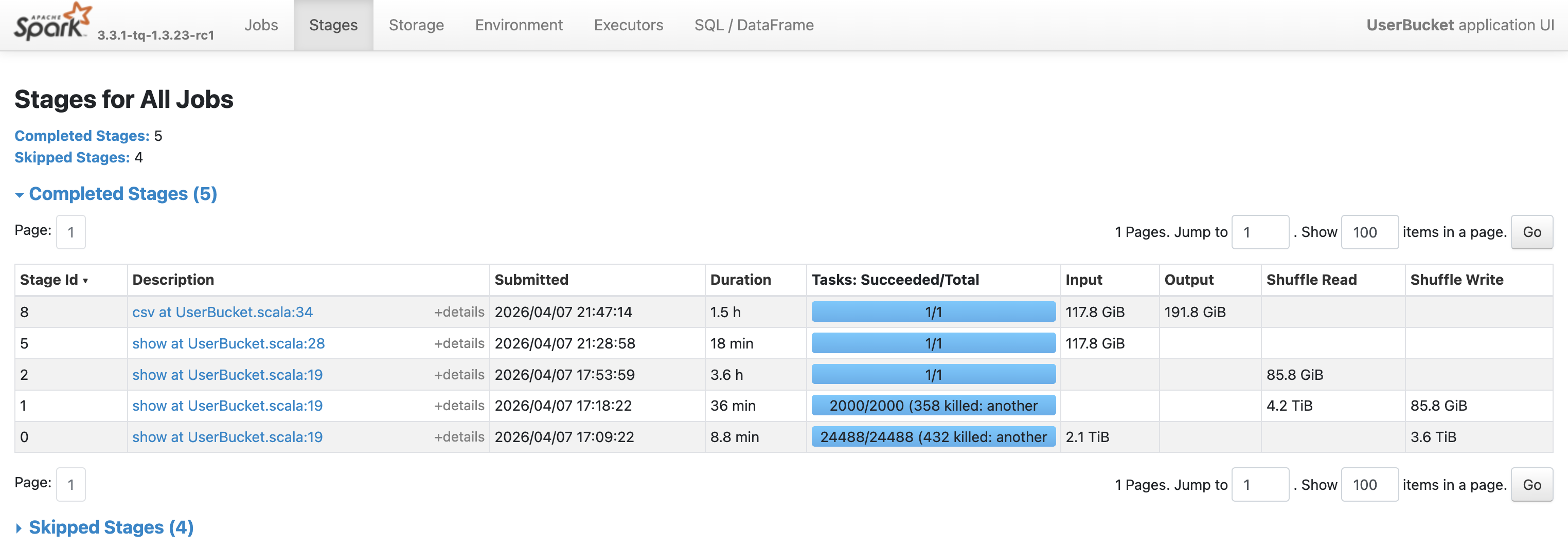
| 阶段 | 动作 | 并行度 | 耗时 |
|---|---|---|---|
| 0 | 读表,按用户id聚合,计算cpr | 24488 | 8.8 min |
| 1 | 窗口函数部分计算 | 2000 | 36 min |
| 2 | 窗口函数最终计算,全局排序 | 1 | 3.6 h |
| 8 | 输出CSV | 1 | 1.5 h |
可以看到,瓶颈在于Stage 2,需要在单个task中读取85.8 GB的shuffle数据并进行全局排序,导致计算过慢。
方法2:采样+近似分界点
分析问题要求可以发现,桶内用户的顺序并不重要,只需找到相邻桶的cpr分界点即可。例如,如果知道1和2桶的分界点是39.30,2和3桶的分界点是86.72,那么39.30 < cpr ≤ 86.72的用户都属于2桶。
因此,考虑对数据进行采样,在采样的数据上计算出所有桶的近似cpr分界点,之后根据这些分界点直接计算桶id:
1
2
3
4
5
CASE WHEN cpr > 1409.54 THEN 10
WHEN cpr > 808.29 THEN 9
...
WHEN cpr > 39.30 THEN 2
ELSE 1 END AS bucket_id
这样可以避免对全量数据进行排序,以牺牲一定的准确率为代价节省计算时间。修改后的代码如下(采样率取1/10000):
1
2
3
4
5
6
7
8
9
10
11
12
13
14
15
16
17
18
19
20
21
22
23
24
25
26
27
28
29
30
def calcUserBucket(userPosInfo: DataFrame, bucketNum: Int): DataFrame = {
  val userAgg = userPosInfo
    .groupBy("user_id")
    .agg(
      sum("req_cnt").as("req_cnt"),
      sum("cost").as("cost"))
    .filter("req_cnt > 0")
    .withColumn("cpr", expr("cost / req_cnt"))
    .cache()

  val sampledUserBucket = userAgg
    .sample(0.0001)
    .withColumn("cum_req_cnt", sum("req_cnt").over(Window.orderBy(desc("cpr"))))
    .withColumn("total_req_cnt", sum("req_cnt").over(Window.partitionBy()))
    .withColumn("cum_ratio", expr("cum_req_cnt / total_req_cnt"))
    .withColumn("bucket_id", expr(s"$bucketNum + 1 - ceil(cum_ratio * $bucketNum)"))

  val cprBounds = sampledUserBucket
    .groupBy("bucket_id")
    .agg(min("cpr").as("min_cpr"))
    .collect()
    .map(r => (r.getAs[Long]("bucket_id"), r.getAs[Double]("min_cpr")))
    .sortBy(-_._2)

  val bucketConditions = cprBounds.tail
    .foldLeft(when(col("cpr") > cprBounds.head._2, cprBounds.head._1))(
      (c, t) => c.when(col("cpr") > t._2, t._1))
    .otherwise(1)
  userAgg.withColumn("bucket_id", bucketConditions)
}
耗时缩短到27 min(计算22 min + 输出5.4 min)。
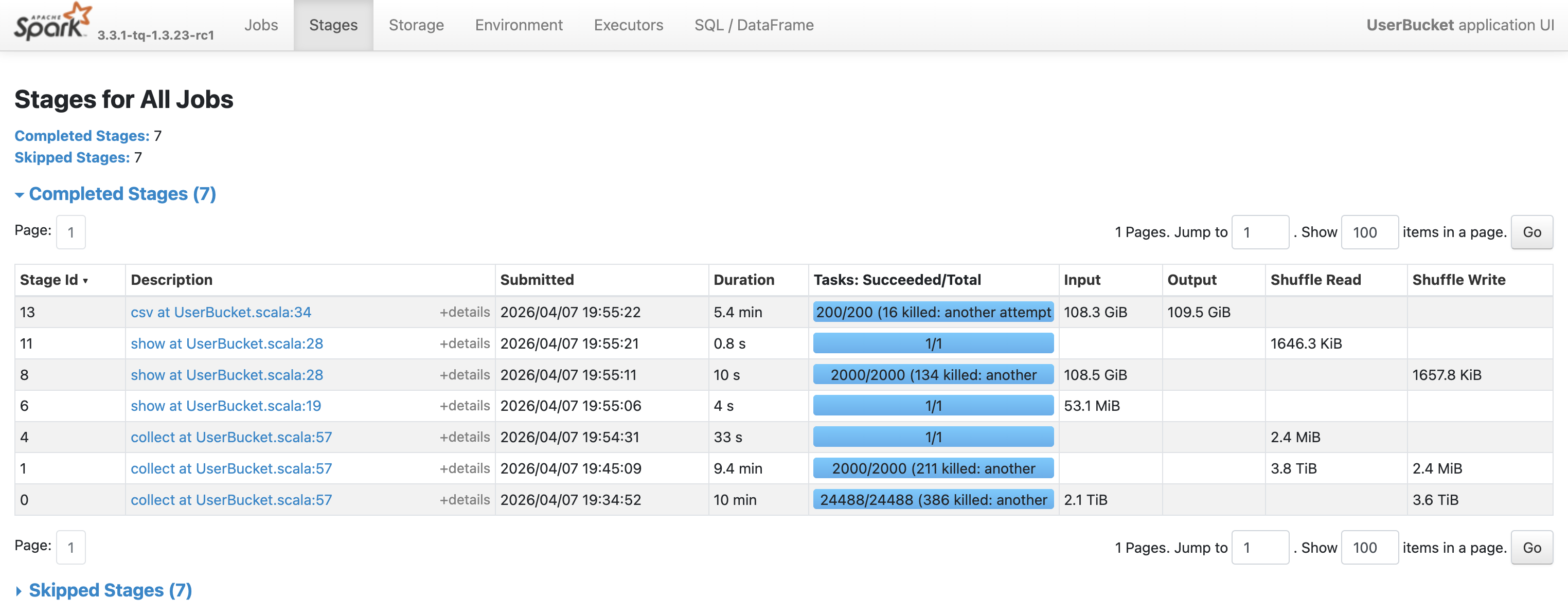
计算结果中各个桶的cpr顺序正确,请求量大致相等。
1
2
3
4
5
6
7
8
9
10
11
12
13
14
15
calcUserBucket finished, cost 1221.96 seconds
+---------+---------+------------+-----------+-----------+
|bucket_id| user_cnt|     req_cnt|    max_cpr|    min_cpr|
+---------+---------+------------+-----------+-----------+
|       10|331748321|274920287794|   1.0449E8|1402.167424|
|        9|183232702|274650091412|1402.167414|  803.64513|
|        8|146740515|292937877345| 803.645125| 549.270396|
|        7|135683719|282257349368| 549.270386| 388.121402|
|        6|118403632|274375513881|   388.1214| 280.258069|
|        5|105833068|267761199624| 280.258065| 200.627931|
|        4|103250637|281394585299| 200.627929|  133.76862|
|        3| 98452352|283643792147| 133.768618|  77.901462|
|        2| 87066739|252093118582|   77.90146|  34.881892|
|        1|798795286|245856876632|   34.88189|        0.0|
+---------+---------+------------+-----------+-----------+
通过与方法1的精确结果进行比较,可以计算出用户分桶的准确率为2017323519/2112604384=95.5%。这个准确率与采样率有关,采样率越高准确率越高,但计算越慢。
方法3:分区排序
方法1之所以那么慢,是因为排序阶段由单个task完成。可以考虑采用快速排序的思想,将数据集划分为多个分区,分区间有序,然后在各分区内排序,以便利用Spark的并行计算能力。
Spark的键值对RDD支持repartitionAndSortWithinPartitions()操作,能够根据给定的分区器对RDD进行重新分区,并在每个分区内按key进行排序。这种方法比先调用repartition()再在每个分区内排序更高效,因为它可以将排序操作下推到shuffle机制中。
RangePartitioner能够将RDD按照key的范围划分为大致相等的区间。参见 https://zhuanlan.zhihu.com/p/665111208 。
为了使用分区排序,必须将DataFrame转换为RDD[Row],并以-cpr作为key以便降序排序。repartitionAndSortWithinPartitions()操作生成的RDD是分区间、分区内都有序的。之后依次计算每个分区的累积请求量(相当于手动实现窗口函数),最后转换回DataFrame并计算桶id。完整代码如下:
1
2
3
4
5
6
7
8
9
10
11
12
13
14
15
16
17
18
19
20
21
22
23
24
25
26
27
28
29
30
31
32
33
34
def calcUserBucket(spark: SparkSession, userPosInfo: DataFrame, bucketNum: Int): DataFrame = {
  val userAgg = userPosInfo
    .groupBy("user_id")
    .agg(
      sum("req_cnt").as("req_cnt"),
      sum("cost").as("cost"))
    .filter("req_cnt > 0")
    .withColumn("cpr", expr("cost / req_cnt"))
    .cache()

  val rddWithKey = userAgg.rdd.map(row => (-row.getAs[Double]("cpr"), row))
  val partitionSortedRdd = rddWithKey
    .repartitionAndSortWithinPartitions(new RangePartitioner(1000, rddWithKey))
    .map(_._2)

  val partitionCumReqCnt = partitionSortedRdd
    .mapPartitions(rows => Iterator(rows.map(_.getAs[Long]("req_cnt")).sum))
    .collect()
    .scanLeft(0L)(_ + _)
  val totalReqCnt = partitionCumReqCnt.last

  val cumRatioRdd = partitionSortedRdd.mapPartitionsWithIndex { (idx, rows) =>
    var localCumReqCnt = partitionCumReqCnt(idx)
    rows.map { row =>
      localCumReqCnt += row.getAs[Long]("req_cnt")
      val cumRatio = localCumReqCnt.toDouble / totalReqCnt
      Row.fromSeq(row.toSeq :+ cumRatio)
    }
  }

  val newSchema = StructType(userAgg.schema :+ StructField("cum_ratio", DoubleType))
  spark.createDataFrame(cumRatioRdd, newSchema)
    .withColumn("bucket_id", expr(s"$bucketNum + 1 - ceil(cum_ratio * $bucketNum)")).cache()
}
分桶结果如下,准确率为2112584485/2112604384=99.999%
1
2
3
4
5
6
7
8
9
10
11
12
13
14
15
calcUserBucket finished, cost 13951.86 seconds
+---------+---------+------------+-----------+-----------+
|bucket_id| user_cnt|     req_cnt|    max_cpr|    min_cpr|
+---------+---------+------------+-----------+-----------+
|       10|330282810|272989032912|   1.0449E8|1409.544456|
|        9|182574435|272989105068|1409.544454| 808.294355|
|        8|136727249|272989067180|  808.29435| 566.414343|
|        7|132826920|272989071282|  566.41433| 403.616495|
|        6|119265555|272989045185| 403.616494| 291.970926|
|        5|108953339|272989093350| 291.970925| 208.354515|
|        4|100921987|272989067917| 208.354512| 141.902804|
|        3| 95360210|272989066106| 141.902804|  86.719478|
|        2| 93874745|272989047912|  86.719473|  39.304095|
|        1|808419721|272989095172|  39.304094|        0.0|
+---------+---------+------------+-----------+-----------+
奇怪的是,这次任务花费了7.8 h(计算7.6 h + 输出12 min),反而比全局排序更慢。从Spark UI可以看到,瓶颈在Stage 4和Stage 10,分别耗时3.4 h和3.8 h:
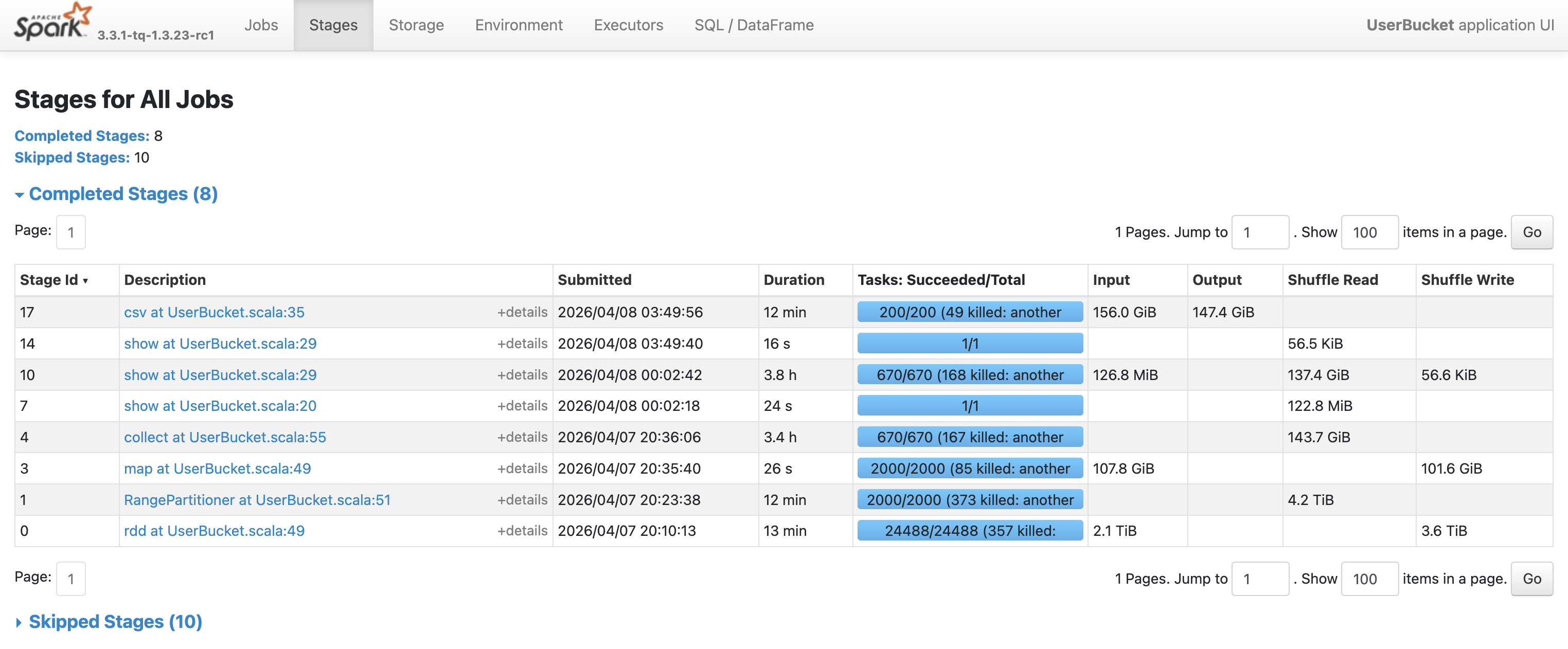
查看这两个阶段内任务的耗时情况,发现红框中任务处理的数据量和耗时远大于其他任务,这是典型的数据倾斜现象。
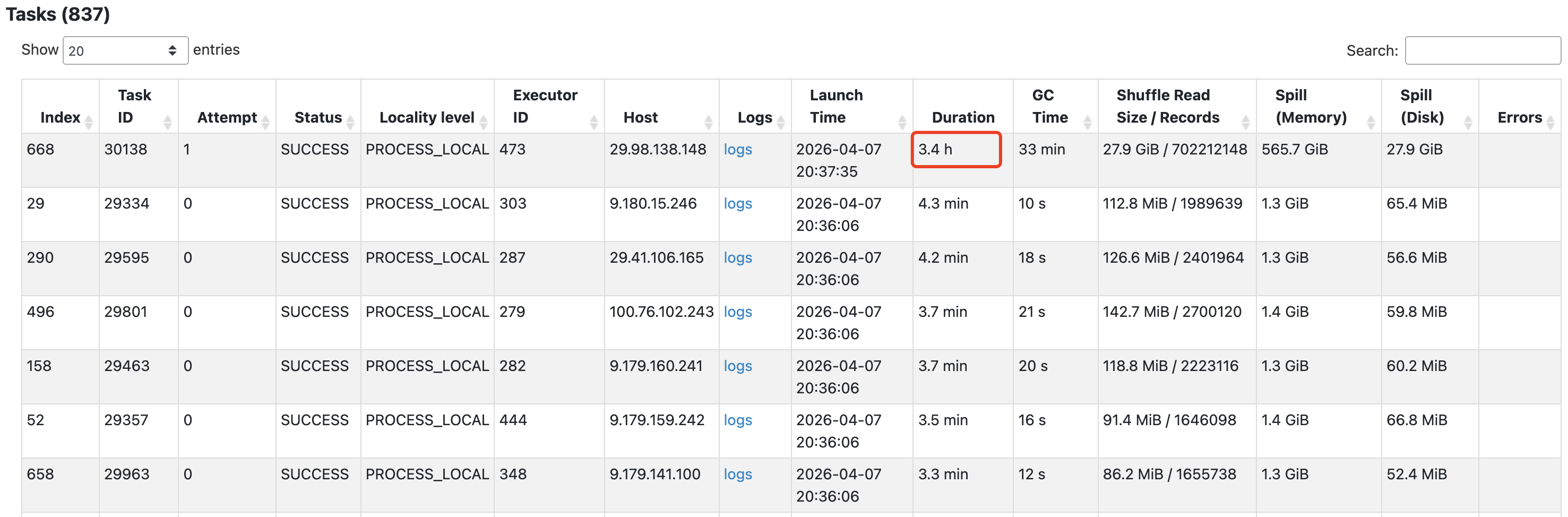
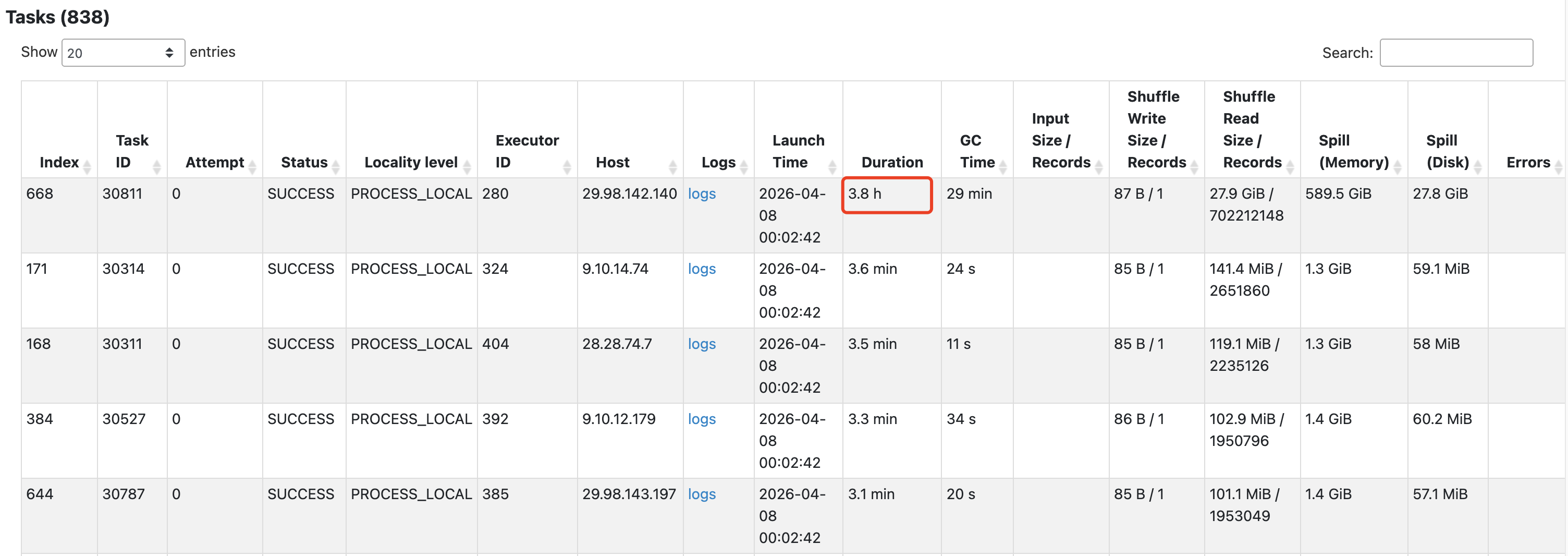
有时还会导致任务反复失败以及executor心跳超时。

为了验证这个问题,统计用户的cpr分布:
| cpr | 用户数量(亿) |
|---|---|
| 0 | 7 |
| (0, 10] | 0.37 |
| (10, 100] | 1.93 |
| (100, 1000] | 7.41 |
| (1000, 10000] | 3.77 |
| (10000, +∞) | 0.5 |
可以看到,cpr=0的用户占了1/3。RangePartitioner会确保key相等的数据一定在同一个分区,当某个key值的数据量极大时,就会产生严重的数据倾斜。
解决这个问题的常用方法是加盐,即给key添加随机扰动,避免大量数据被划分到同一个分区。
1
2
3
4
val rddWithKey = userAgg.rdd.map { row =>
  val salt = Random.nextDouble() * 1e-6
  (-row.getAs[Double]("cpr") + salt, row)
}
这里选择1e-6是因为相对于cpr值足够小(1桶的cpr上界是39.30),不会影响排序结果,但能够将cpr=0的数据分散到不同分区。
重新运行任务,耗时降至26 min(计算25 min + 输出52 s)。
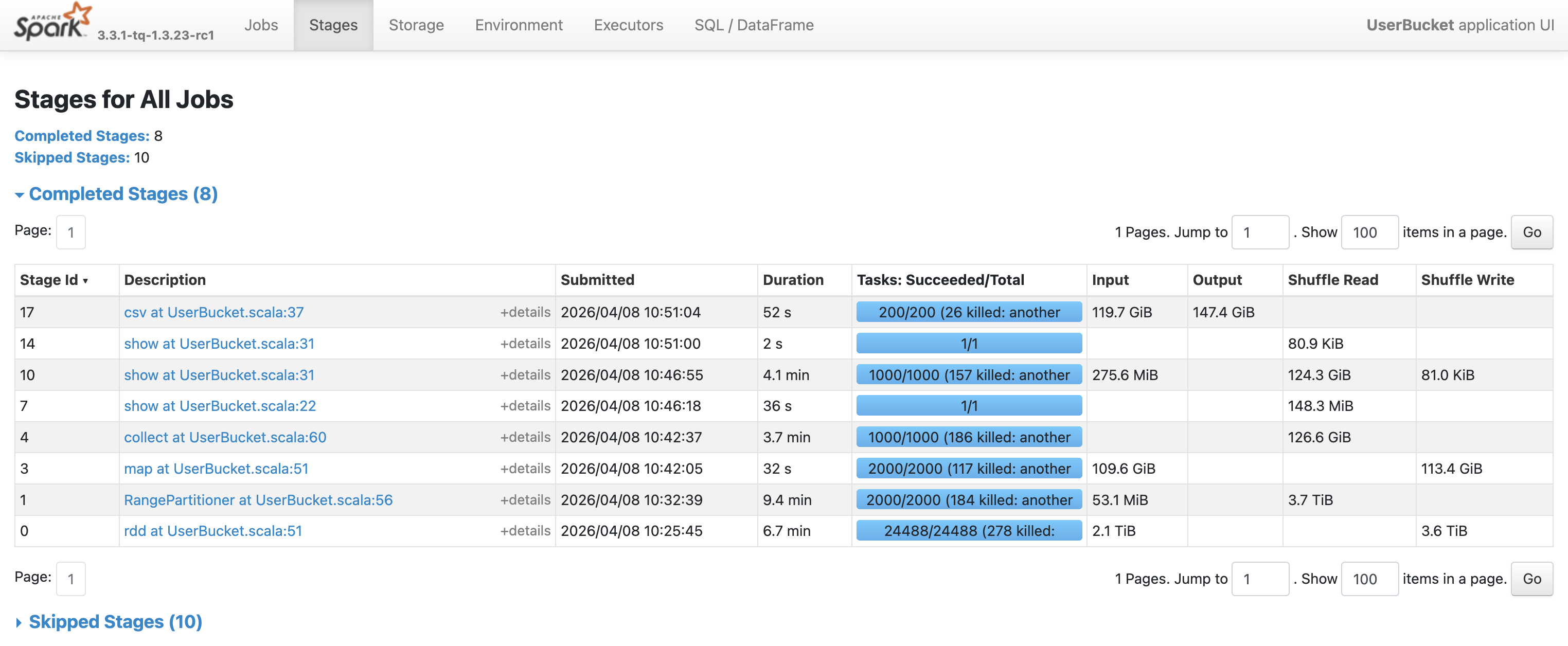
分桶结果与之前完全相同。
1
2
3
4
5
6
7
8
9
10
11
12
13
14
15
calcUserBucket finished, cost 1275.07 seconds
+---------+---------+------------+-----------+-----------+
|bucket_id| user_cnt|     req_cnt|    max_cpr|    min_cpr|
+---------+---------+------------+-----------+-----------+
|       10|330282810|272989032912|   1.0449E8|1409.544456|
|        9|182574435|272989105068|1409.544454| 808.294355|
|        8|136727249|272989067180|  808.29435| 566.414343|
|        7|132826920|272989071282|  566.41433| 403.616495|
|        6|119265555|272989045185| 403.616494| 291.970926|
|        5|108953339|272989093350| 291.970925| 208.354515|
|        4|100921987|272989067917| 208.354512| 141.902804|
|        3| 95360210|272989066106| 141.902804|  86.719478|
|        2| 93874745|272989047912|  86.719473|  39.304095|
|        1|808419721|272989095172|  39.304094|        0.0|
+---------+---------+------------+-----------+-----------+
分区排序的方法既能加快计算速度,同时又保持了较高的准确率。唯一的缺点是代码实现比较复杂,必须回退到处理RDD[Row]。
总结
下表总结了本文尝试的三种方法的优缺点以及适用场景。
| 方法 | 耗时 | 准确率 | 优点 | 缺点 | 适用场景 |
|---|---|---|---|---|---|
| 全局排序 | 6.1 h | 100% | 实现简单,绝对准确 | 速度太慢 | 数据量小或对准确性要求高 |
| 采样+近似分界点 | 27 min | 95.5% | 速度快 | 准确率较低,与采样率有关 | 对准确性不敏感,追求速度 |
| 分区排序 | 26 min | 99.999% | 速度快,准确率高 | 代码实现较复杂 | 平衡速度和准确性 |