【C++】日期和时间库
在C++中处理日期和时间有两种选择:继承自C语言的<ctime>,以及C++11引入的<chrono>。
本文将概述这两个日期时间库的用法,并重点介绍现代C++的日期、时间和时区操作,以及格式化和解析。
1.C风格日期时间库
C++完全兼容C的日期时间库<ctime>,这个头文件提供了最基础的时间处理工具。
注:对于大部分C标准库头文件xxx.h,C++标准库提供了xxx.h和cxxx两种形式的头文件(例如<time.h>对应<ctime>)。区别是前者将所有声明放在全局命名空间中,而后者放在std命名空间中。不过,前者可能同时提供std命名空间、后者可能同时提供全局命名空间。例如,包含<time.h>会提供time(),可能也会提供std::time()。纯C++代码应该使用cxxx形式。
1.1 核心类型
time_t
std::time_t是表示时间的算术类型。C++标准并未规定其具体含义,但大多数实现将其定义为一个整数类型,表示从Unix纪元(1970-1-1 00:00:00 UTC)经过的秒数。
函数std::time()返回用std::time_t表示的当前时间,如果arg不为空指针则同时将其赋给arg指向的对象。
1
std::time_t time(std::time_t* arg);
例如:
1
2
3
4
5
6
7
#include <ctime>
#include <iostream>

int main() {
    std::time_t now = std::time(nullptr);
    std::cout << now << " seconds since the Epoch\n";
}
可能的输出:
1
1793290655 seconds since the Epoch
注意:std::time_t不计入闰秒。如果实现将其定义为32位有符号整数,将会在2038-1-19 11:14:08溢出,称为“2038年问题”。
clock_t
std::clock_t是表示进程运行时间的算术类型。
函数std::clock()返回自程序开始执行所经过的处理器时间(CPU时钟周期数)。宏CLOCKS_PER_SEC定义为每秒的时钟周期数(通常是1000或1000000)。
例如:
1
2
3
4
std::clock_t start = std::clock();
do_some_work();
std::clock_t end = std::clock();
std::cout << "CPU time used: " << 1000.0 * (end - start) / CLOCKS_PER_SEC << " ms\n";
注:std::clock()时间可能快于或慢于现实时间,取决于操作系统给程序的执行资源。
struct tm
std::tm是保存日历日期和时间的结构体,包含以下成员:
| 成员 | 含义 | 范围 |
|---|---|---|
int tm_sec | 秒(允许闰秒) | [0, 60] |
int tm_min | 分钟 | [0, 59] |
int tm_hour | 小时 | [0, 23] |
int tm_mday | 日 | [1, 31] |
int tm_mon | 月(0表示一月) | [0, 11] |
int tm_year | 自1900年经过的年数 | |
int tm_wday | 星期(0表示星期日) | [0, 6] |
int tm_yday | 自1月1日经过的天数 | [0, 365] |
int tm_isdst | 夏令时标志(有效为正,无效为0, 无可用信息为负) |
例如:
1
2
3
4
5
6
7
8
9
std::tm t{};
t.tm_year = 2006 - 1900;
t.tm_mon = 0;  // January
t.tm_mday = 2;
t.tm_hour = 15;
t.tm_min = 4;
t.tm_sec = 5;
std::mktime(&t);  // calculate tm_wday
std::cout << std::asctime(&t);
输出:
1
Mon Jan 02 15:04:05 2006
标准库没有为std::tm类型提供日期计算函数(例如增加指定的天数、计算两个日期相差的天数等)。要实现这类计算,需要先把std::tm转换成std::time_t,然后计算秒数,最后再转换回std::tm。见下一节的示例。
1.2 转换函数
标准库提供了不同时间格式之间的转换函数,如下表所示。
| 函数 | 描述 |
|---|---|
mktime() | 将std::tm(本地时间)转换为std::time_t |
gmtime() | 将std::time_t转换为std::tm(UTC时间) |
localtime() | 将std::time_t转换为std::tm(本地时间) |
ctime() | 将std::time_t转换为文本表示 |
asctime() | 将std::tm转换为文本表示 |
strftime() | 将std::tm转换为自定义文本表示 |
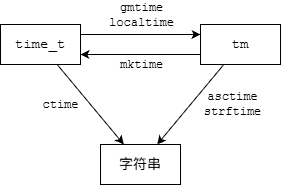
函数std::mktime()将本地日历时间std::tm转换为从纪元经过的时间std::time_t(时区由环境变量TZ指定)。如果转换成功,会将参数time的所有字段更新为正确范围的值,并重新计算tm_wday和tm_yday。如果失败则返回-1。
1
std::time_t mktime(std::tm* time);
函数std::gmtime()和std::localtime()分别将std::time_t转换为UTC日历时间和本地日历时间,返回指向内部共享std::tm对象的指针,如果失败则返回空指针。注意这两个函数非线程安全。
1
2
std::tm* gmtime   (const std::time_t* time);
std::tm* localtime(const std::time_t* time);
下面的示例计算给定日期增加指定天数后的日期,以及两个日期相差的天数。
1
2
3
4
5
6
7
8
9
10
11
12
13
14
15
16
17
18
19
20
21
22
23
24
25
26
27
28
29
30
31
32
33
34
35
36
37
38
39
40
41
42
#include <ctime>
#include <iostream>

// add n days to d, return 0 on success
int add_days(std::tm* d, int n) {
    std::time_t t = std::mktime(d);
    if (t == -1) return -1;

    t += n * 86400;
    std::tm* nd = std::localtime(&t);
    if (!nd) return -1;

    *d = *nd;
    return 0;
}

// return number of days between d1 and d2, or -1 on error
int days_between(std::tm* d1, std::tm* d2) {
    std::time_t t1 = std::mktime(d1);
    std::time_t t2 = std::mktime(d2);
    if (t1 == -1 || t2 == -1) return -1;

    double diff = std::difftime(t1, t2);
    return static_cast<int>(diff / 86400);
}

int main() {
    std::tm t{};
    t.tm_year = 99;
    t.tm_mon = 11;
    t.tm_mday = 31;
    std::mktime(&t);  // 1999-12-31

    std::tm t2 = t;
    add_days(&t2, 1000);
    std::cout << std::asctime(&t) << " plus 1000 days is "
        << std::asctime(&t2) << '\n';

    int n = days_between(&t2, &t);
    std::cout << n << " days between " << std::asctime(&t)
        << " and " << std::asctime(&t2);
}
输出:
1
2
3
4
5
Fri Dec 31 00:00:00 1999
 plus 1000 days is Thu Sep 26 00:00:00 2002

1000 days between Fri Dec 31 00:00:00 1999
 and Thu Sep 26 00:00:00 2002
1.3 自定义格式化
函数std::ctime()和std::asctime()只能将时间转换成固定格式的文本(Www Mmm dd hh:mm:ss yyyy\n)。std::strftime()可以按照自定义格式字符串将std::tm转换成文本,写入str指向的字符数组,返回写入的字符数(不包括结尾的'\0')。如果数组str空间不够则返回0。
1
std::size_t strftime(char* str, std::size_t count, const char* format, const std::tm* tp);
格式字符串可以包含以%开头的转换说明符(类似于printf())。下表列出了常用的转换说明符,完整列表参见strftime Format string。
| 转换说明符 | 含义 | 示例 |
|---|---|---|
Y | 年 | 2017 |
y | 年(两位数) | 17 |
m | 月 | 10 |
b | 月(缩写) | Oct |
B | 月(全称) | October |
d | 日 | 27 |
a | 星期(缩写) | Fri |
A | 星期(全称) | Friday |
H | 小时 | 18 |
M | 分钟 | 40 |
S | 秒 | 25 |
F | 等价于%Y-%m-%d(ISO 8601日期格式) | 2017-10-27 |
T | 等价于%H:%M:%S(ISO 8601时间格式) | 18:40:25 |
z | 时区偏移量 | +0800 |
Z | 时区名称 | UTC |
% | 百分号 | % |
例如:
1
2
3
4
std::time_t t = std::time(nullptr);
char buf[100];
std::strftime(buf, sizeof(buf), "%Y-%m-%d %A %H:%M:%S", std::localtime(&t));
std::cout << buf << '\n';
可能的输出:
1
2021-09-07 Tuesday 19:40:35
注:
- C++标准规定的
<ctime>并没有提供将字符串解析为日期的函数。但POSIX提供了strptime()。 - 头文件
<iomanip>提供了一对函数std::get_time()和std::put_time(),用于从C++输入/输出流按自定义格式读写std::tm对象。
虽然C风格日期时间库在C++中仍然可用,但存在线程不安全、年份和月份的偏移容易写错、缺少方便的日期计算函数等问题。因此,C++11引入了chrono库。
2.Chrono库
2.1 概述
Chrono库定义在头文件<chrono>中,其中的声明位于命名空间std::chrono。Chrono库主要提供了以下几种类型:
- 时钟:
system_clock、steady_clock等 - 时间点:
time_point - 时长:
duration - 日历(C++20):
year_month_day等 - 时区(C++20):
time_zone、zoned_time等
2.2 时长
类模板std::chrono::duration表示时长,即时间间隔。
1
2
template<class Rep, class Period = std::ratio<1>>
class duration;
duration由计数和单位组成。成员函数count()返回计数,其类型由模板参数Rep指定(可以是整型或浮点型)。单位由模板参数Period指定(通常是std::ratio),表示与秒的比值。
例如:
1
2
3
4
5
6
7
8
9
#include <chrono>
#include <iostream>

int main() {
    std::chrono::duration<int, std::ratio<3600>> d1(8);
    std::chrono::duration<float, std::ratio<1, 1000>> d2(1.5);
    std::cout << "d1 = " << d1.count() << " hours\n";
    std::cout << "d2 = " << d2.count() << " milliseconds\n";
}
输出:
1
2
d1 = 8 hours
d2 = 1.5 milliseconds
D类型的时长对象d所表示的实际时间间隔(秒数)大致等于d.count() * D::period::num / D::period::den(但要注意整数除法)。不过,通常不需要像这样手动计算,可以直接进行单位转换,见2.2.3节。
2.2.1 std::ratio
类模板std::ratio定义在头文件<ratio>中,表示编译期有理数(rational)。
1
2
template<std::intmax_t Num, std::intmax_t Den = 1>
class ratio;
静态数据成员num和den分别表示分子(numerator)和分母(denominator),由模板参数Num和Den约分后得到。例如:
1
2
3
4
using half = std::ratio<3, 6>;
using three_quarter = std::ratio<3, 4>;
std::cout << "half is " << half::num << "/" << half::den << '\n';
std::cout << "three_quarter is " << three_quarter::num << "/" << three_quarter::den << '\n';
输出:
1
2
half is 1/2
three_quarter is 3/4
标准库提供了一些对应国际单位制(SI)比例的类型别名:
1
2
3
4
5
6
7
8
9
10
11
12
...
using nano  = ratio<1, 1000000000>;  // 10^-9
using micro = ratio<1, 1000000>;     // 10^-6
using milli = ratio<1, 1000>;        // 10^-3
using centi = ratio<1, 100>;         // 10^-2
using deci  = ratio<1, 10>;          // 10^-1
using deca  = ratio<10, 1>;          // 10^1
using hecto = ratio<100, 1>;         // 10^2
using kilo  = ratio<1000, 1>;        // 10^3
using mega  = ratio<1000000, 1>;     // 10^6
using giga  = ratio<1000000000, 1>;  // 10^9
...
2.2.2 别名和字面值
标准库为一些常用的duration类型预定义了别名。例如,std::chrono::milliseconds表示毫秒(第一个模板参数也可能是其他整数类型):
1
using milliseconds = duration<int64_t, std::milli>;
另外,还为部分时长类型提供了字面值。例如,可以直接写5ms而不是std::chrono::milliseconds(5),但需要声明using namespace std::chrono_literals。
1
2
3
using namespace std::chrono_literals;
auto lesson = 45min;
std::cout << "One lesson is " << lesson.count() << " minutes\n";
下表列出了所有时长别名和字面值:
| 别名 | 含义 | 单位 | 字面值后缀 |
|---|---|---|---|
nanoseconds | 纳秒 | std::nano | ns |
microseconds | 微秒 | std::micro | us |
milliseconds | 毫秒 | std::milli | ms |
seconds | 秒 | std::ratio<1> | s |
minutes | 分钟 | std::ratio<60> | min |
hours | 小时 | std::ratio<3600> | h |
days (C++20) | 天 | std::ratio<86400> | |
weeks (C++20) | 周 | std::ratio<604800> | |
months (C++20) | 月 | std::ratio<2629746> | |
years (C++20) | 年 | std::ratio<31556952> |
注:
years等于365.2425days(格里高利年的平均长度),months等于1/12years。- 这些别名的计数类型(
Rep)都是某种有符号整数(如int64_t)。如果需要浮点数表示则必须自己定义。 - 字面值后缀
d和y表示的不是days和years,而是day和year,见2.4.1节。
例如,可以像这样让当前线程sleep指定的秒数:
1
std::this_thread::sleep_for(std::chrono::seconds(n));
2.2.3 单位转换
除了直接用数字构造duration对象,还可以用另一个(单位可能不同的)duration对象来构造,从而实现单位转换。但是,这种方式要求转换必须是“无损的”。具体来说,要用一个duration<Rep, Period>对象来构造duration<Rep2, Period2>对象,必须满足以下条件之一:
Rep2是浮点型。Rep和Rep2都是整型,且Period能被Period2整除。(例如,可以用分钟构造秒,但不能用秒构造分钟)
如果不满足以上条件,就必须使用std::chrono::duration_cast进行转换(可能是有损的)。对于一个duration<Rep, Period>类型的对象d,表达式
1
duration_cast<duration<Rep2, Period2>>(d)
大致等价于
1
2
3
duration<Rep2, Period2>(static_cast<Rep2>(
    std::common_type_t<Rep, Rep2>(d.count()) *
    Period::num * Period2::den / (Period::den * Period2::num)))
注:其实就是简单的分数运算
1
2
3
4
d1 = N1 * (m1 / n1)
d2 = N2 * (m2 / n2)
d1 = d2
=> N2 = N1 * m1 * n2 / (n1 * m2)
例如:
1
2
3
4
5
6
7
8
9
10
11
12
13
14
15
16
#include <chrono>
#include <iostream>

int main() {
    using namespace std::chrono;
    seconds s = 1min;  // OK, minutes is divisible by seconds
    std::cout << "1min = " << s << '\n';

    // minutes m = 1000s;  // error: seconds is not divisible by minutes
    using double_minutes = duration<double, std::ratio<60>>;
    double_minutes md = 1000s;  // OK, floating point type
    std::cout << "1000s = " << md << '\n';

    minutes m = duration_cast<minutes>(1000s);
    std::cout << "cast with loss: 1000s = " << m << '\n';
}
输出:
1
2
3
1min = 60s
1000s = 16.6667min
cast with loss: 1000s = 16min
注:从C++20起才能直接输出duration对象。
C++17还引入了三个非成员函数,用于对时长按不同周期进行“取整”。对于D类型的时长对象d,
| 表达式 | 结果 |
|---|---|
floor<D2>(d) | 将d转换为D2并下取整 |
ceil<D2>(d) | 将d转换为D2并上取整 |
round<D2>(d) | 将d转换为D2并四舍五入 |
例如:
1
2
3
4
5
6
using namespace std::chrono;
seconds s = 160s;
std::cout << "cast:  " << duration_cast<minutes>(s) << '\n';
std::cout << "floor: " << floor<minutes>(s) << '\n';
std::cout << "ceil:  " << ceil<minutes>(s) << '\n';
std::cout << "round: " << round<minutes>(s) << '\n';
输出:
1
2
3
4
cast:  2min
floor: 2min
ceil:  3min
round: 3min
2.2.4 算术运算
duration支持基本的算术运算。对于两个D类型的时长对象d和d2,以及数值s,支持的算术运算如下表所示。
| 表达式 | 结果 |
|---|---|
d + d2 | D(d.count() + d2.count()) |
d - d2 | D(d.count() - d2.count()) |
d * s | D(d.count() * s) |
d / s | D(d.count() / s) |
d / d2 | 数值d.count() / d2.count() |
d % s | D(d.count() % s) |
d % d2 | 数值d.count() % d2.count() |
如果两个时长操作数属于不同的类型duration<Rep1, Period1>和duration<Rep2, Period2>,会使用std::common_type转换为公共类型duration<Rep, Period>:
Rep = std::common_type_t<Rep1, Rep2>Period = std::ratio<GCD(Period1::num, Period2::num), LCM(Period1::den, Period2::den)>
例如:
1
2
3
4
std::chrono::seconds earth_day = 23h + 56min + 4s;
std::cout << "earth_day = " << earth_day << '\n';
std::cout << "earth_day / 60min = " << earth_day / 60min << '\n';
std::cout << "earth_day * 7 = " << earth_day * 7 << '\n';
输出:
1
2
3
earth_day = 86164s
earth_day / 60min = 23
earth_day * 7 = 603148s
2.3 时间点
时间点(time point)表示从特定时钟的“纪元”(epoch)开始经过的时长。类模板std::chrono::time_point表示一个时间点:
1
2
template<class Clock, class Duration = typename Clock::duration>
class time_point;
其实现只存储一个Duration类型的值,表示从Clock的纪元开始的时间间隔,成员函数time_since_epoch()返回这个值。Clock是时钟类型,必须满足具名要求Clock,Duration是一种std::chrono::duration类型。
注:时钟的成员类型Clock::duration表示该时钟的周期长度,Clock::time_point等价于std::chrono::time_point<Clock>。
2.3.1 时钟
可以通过调用时钟类型的静态成员函数now()来获取该时钟的当前时间点。常用的时钟类型如下:
| 时钟 | 含义 | 纪元 | 周期长度 |
|---|---|---|---|
system_clock | 表示真实时间的系统时钟,可能被调整 | Unix纪元(1970-1-1 00:00:00 UTC) | 未指定(GCC为纳秒,MSVC为100纳秒) |
steady_clock | 永远不会被调整的单调时钟, 与真实时间无关,最适合度量间隔 | 未指定(可能是机器上次重启时间) | 未指定(GCC和MSVC均为纳秒) |
high_resolution_clock | 具有最短周期的时钟,可能是前两者的别名 (GCC为 system_clock,MSVC为steady_clock) |
标准库为系统时钟不同周期的时间点定义了以下别名。其中sys_days在处理日历类型时经常用到,见2.4.3节。
1
2
3
4
template<class Duration>
using sys_time = time_point<system_clock, Duration>;
using sys_seconds = sys_time<seconds>;
using sys_days = sys_time<days>;
例如:
1
2
3
4
5
6
using namespace std::chrono;
time_point<system_clock> now = system_clock::now();
time_point<steady_clock> now2 = steady_clock::now();
std::cout << "Different clocks are not comparable:\n"
    << "  System time: " << now.time_since_epoch() << '\n'
    << "  Steady time: " << now2.time_since_epoch() << '\n';
可能的输出:
1
2
3
Different clocks are not comparable:
  System time: 1793639372438193000ns
  Steady time: 359694105969500ns
system_clock是唯一能将其时间点转换为C风格时间的时钟。静态成员函数to_time_t()将system_clock::time_point转换为std::time_t,from_time_t()完成反向转换。例如:
1
2
3
auto now = system_clock::now();
std::time_t t = system_clock::to_time_t(now);
std::cout << "The system clock is currently at " << std::ctime(&t);
2.3.2 算术运算
时间点和时长可以进行加减运算。对于两个T = time_point<C, D>类型的对象t和t2,以及D类型的时长对象d:
| 表达式 | 结果 |
|---|---|
t + d | T(t.time_since_epoch() + d) |
t - d | T(t.time_since_epoch() - d) |
t - t2 | 时长t.time_since_epoch() - t2.time_since_epoch() |
注:
- 也可以使用
==、<等运算符比较两个time_point。 - 只有相同时钟的时间点才能相减或比较;如果时长类型不同,会使用
std::common_type转换为公共类型。
例如,下面的程序测量某个计算花费的时长:
1
2
3
4
5
6
7
8
9
10
11
12
13
14
15
16
17
18
19
20
21
22
#include <algorithm>
#include <chrono>
#include <iostream>

void slow_motion() {
    static int a[]{1, 2, 3, 4, 5, 6, 7, 8, 9, 10, 11, 12};
    // Generate Γ(13) == 12! permutations:
    while (std::ranges::next_permutation(a).found) {}
}

int main() {
    using namespace std::chrono;

    auto start = steady_clock::now();
    slow_motion();
    auto end = steady_clock::now();
    auto diff = end - start;

    std::cout << "Slow calculations took "
        << diff / 1ms << "ms ≈ "
        << diff / 1s << "s\n";
}
可能的输出:
1
Slow calculations took 47617ms ≈ 47s
C++11的chrono库能很好地做计时和时长计算,但无法处理“某年月日是星期几”这类日历问题。C++20新增的日历类型弥补了这个缺陷。
2.4 日历
C++20在chrono库中引入了日历类型体系。核心是year_month_day,把年、月、日作为独立字段存储,并支持日期计算。
注:不同编译器对C++20日历和时区的支持情况不同,详见Compiler support for C++20 (P0355R7)。支持日历的最低版本是GCC 11、Clang 7和MSVC 19.29,并且需要添加编译选项-std=c++20。
2.4.1 核心类型
以下四个类是日历的基本组成部分,每个类都可以通过构造函数、字面值或预定义常量来创建。
| 类 | 含义 | 构造函数 | 字面值后缀 | 常量 |
|---|---|---|---|---|
year | 年份 | year(y), -32767 ≤ y ≤ 32767 | y | |
month | 月份 | month(m), 1 ≤ m ≤ 12 | January~December | |
day | 日 | day(d), 1 ≤ d ≤ 31 | d | |
weekday | 星期 | weekday(w), 0 ≤ w ≤ 6 | Sunday~Saturday |
注:year可以转换为int,month和day可以转换为unsigned,但必须通过static_cast显式转换。
weekday类的[]运算符可用于创建以下两个类的对象(其中w是一个weekday对象):
| 类 | 含义 | 构造函数 | 下标语法 |
|---|---|---|---|
weekday_indexed | 第n个星期几 | weekday_indexed(w, n), 1 ≤ n ≤ 5 | w[n] |
weekday_last | 最后一个星期几 | weekday_last(w) | w[last] |
特殊常量std::chrono::last用于表示“某月的最后一天”或“某月的最后一个星期几”。
以上“基本组件”可以组合成各种表示完整日期或部分日期的类型,如下表所示。除了显式构造函数,更方便的构造方式是使用字面值和operator/(就像自然书写日期的方式),其中y、m、d、w分别是year、month、day、weekday对象。
| 类 | 含义 | 构造函数 | 字面值语法 |
|---|---|---|---|
month_day | 特定月和日 | month_day(m, d) | m / d |
month_day_last | 特定月的最后一天 | month_day_last(m) | m / last |
month_weekday | 特定月的第n个星期几 | month_weekday(m, w[n]) | m / w[n] |
month_weekday_last | 特定月的最后一个星期几 | month_weekday_last(m, w[last]) | m / w[last] |
year_month | 特定年和月 | year_month(y, m) | y / m |
year_month_day | 特定年、月、日 | year_month_day(y, m, d) | y / m / d |
year_month_day_last | 特定年和月的最后一天 | year_month_day_last(y, mdl) | y / m / last |
year_month_weekday | 特定年和月的第n个星期几 | year_month_weekday(y, m, w[n]) | y / m / w[n] |
year_month_weekday_last | 特定年和月的最后一个星期几 | year_month_weekday_last(y, m, w[last]) | y / m / w[last] |
注:
- 对于创建完整日期,以下三种顺序都可接受:
year/month/daymonth/day/yearday/month/year
day可替换为下列之一:std::chrono::last,表示月的最后一天weekday[n],表示月的第n个星期几weekday[std::chrono::last],表示月的最后一个星期几
- 如果无歧义,也可以使用普通整数。例如,允许
2005y/4/5或5d/April/2005,但不允许5/April/2005。 - 省略第二个
/可以创建部分日期(year_month、month_day等)。 - 日期的
/运算符满足结合律。例如(2005y/April)/5=2005y/(April/5)(实际上这是两个不同的重载,前者是year_month / day,后者是year / month_day)。
例如:
1
2
3
4
5
6
7
8
9
10
11
12
#include <chrono>
#include <iostream>

int main() {
    using namespace std::chrono;

    year_month_day ymd1(2005y, April, 5d);
    std::cout << "ymd1: " << ymd1.year() << '-' << ymd1.month() << '-' << ymd1.day() << '\n';

    year_month_day ymd2 = 2005y / April / 5;
    std::cout << "ymd2: " << ymd2 << '\n';
}
输出:
1
2
ymd1: 2005-Apr-05
ymd2: 2005-04-05
year_month_day没有获取星期的成员函数。要计算特定日期是星期几,可以将其转换为sys_days,再传递给weekday的构造函数。由于year_month_day可隐式转换为sys_days,因此中间转换可省略。例如:
1
2
3
year_month_day ymd = 2005y / April / 5;
weekday wd{sys_days(ymd)};  // or just wd{ymd}
std::cout << ymd << " is " << wd << '\n';
输出:
1
2005-04-05 is Tue
2.4.2 算术运算和有效性检查
year_month_day支持按年或月进行加减。运算符+和-接受years或months类型的操作数(见2.2.2节时长别名)。例如:
1
2
3
4
5
6
7
8
year_month_day ymd = 2021y / July / 1;
std::cout << ymd << '\n';

ymd = ymd + months(4);  // or +=
std::cout << "  + 4 months = " << ymd << '\n';

ymd = ymd - years(10);  // or -=
std::cout << "  - 10 years = " << ymd << '\n';
输出:
1
2
3
2021-07-01
  + 4 months = 2021-11-01
  - 10 years = 2011-11-01
注意,如果day()为29、30或31,结果可能不是合法日期,不会自动调整。例如,2021-01-31加1个月的结果为2021-02-31。
注:作为对比,Python的datetime.date不支持加减“年”和“月”这种非精确时长;Java中java.time.LocalDate的plusYears()和plusMonths()方法会自动将非法结果日期调整到该月的最后一天。
所有日历类型都有成员函数ok(),检查日期是否合法。例如:
1
2
3
4
5
6
7
8
9
10
11
constexpr auto ymd1 = 2020y / July / 1;
static_assert(ymd1.ok());

constexpr auto ymd2 = 2020y / July / 42;
static_assert(!ymd2.ok());

constexpr auto ymd3 = 2020y / February / 29; // ok, leap year
static_assert(ymd3.ok());

constexpr auto ymd4 = ymd3 + years{1}; // bad, not a leap year
static_assert(!ymd4.ok());
下面的safe_add_months()函数改进了+运算符,当结果不合法时调整到该月的最后一天。
1
2
3
4
5
6
7
8
9
10
11
12
13
14
#include <chrono>
#include <iostream>

using namespace std::chrono;

year_month_day safe_add_months(const year_month_day& ymd, const months& m) {
    auto result = ymd + m;
    return result.ok() ? result : result.year() / result.month() / last;
}

int main() {
    year_month_day ymd = 2021y / January / 31;
    std::cout << ymd << " + 1 months = " << safe_add_months(ymd, months(1)) << '\n';
}
输出:
1
2021-01-31 + 1 months = 2021-02-28
year_month_day的运算符+和-不支持days操作数,也不能将两个year_month_day相减。要实现加减天数的计算,需要借助sys_days类型,见下一节。
2.4.3 类型转换
(1)year_month_day和sys_days
year_month_day可以和sys_days相互隐式转换,这分别是通过接受sys_days参数的非显式构造函数和转换运算符operator sys_days实现的。
1
2
year_month_day(const sys_days& d);  // sys_days -> year_month_day
operator sys_days() const;          // year_month_day -> sys_days
其中,sys_days是time_point<system_clock, days>的别名,表示从Unix纪元经过的天数(见2.3.1节)。
例如:
1
2
3
4
5
6
year_month_day ymd = 2022y / December / 15;
sys_days delta = ymd;
std::cout << ymd << " is " << delta.time_since_epoch().count() << " days since epoch\n";

year_month_day ymd2{sys_days{days{1000000}}};
std::cout << "1000000 days after epoch is " << ymd2 << '\n';
输出:
1
2
2022-12-15 is 19341 days since epoch
1000000 days after epoch is 4707-11-29
利用上述转换,可以按以下步骤实现日历的天数加减运算:将year_month_day转换成sys_days,进行时间点运算(2.3.2节),最后转换回year_month_day。
下面的代码用chrono库重新实现了1.2节中的示例:日期增加指定天数、两个日期相差天数。可以看到,与C风格库相比,代码精简了很多。
1
2
3
4
5
6
7
8
9
10
11
12
13
14
15
16
17
18
19
20
21
22
23
#include <chrono>
#include <iostream>

using namespace std::chrono;

// return n days after d
year_month_day add_days(const year_month_day& d, int n) {
    return sys_days{d} + days{n};
}

// return number of days between d1 and d2
int days_between(const year_month_day& d1, const year_month_day& d2) {
    return (sys_days{d1} - sys_days{d2}).count();
}

int main() {
    year_month_day ymd = 1999y / December / 31;
    year_month_day ymd2 = add_days(ymd, 1000);
    std::cout << ymd << " plus 1000 days is " << ymd2 << '\n';

    int n = days_between(ymd2, ymd);
    std::cout << n << " days between " << ymd << " and " << ymd2 << '\n';
}
输出:
1
2
1999-12-31 plus 1000 days is 2002-09-26
1000 days between 1999-12-31 and 2002-09-26
像这样获取当前日期:
1
2
3
4
5
6
time_point<system_clock> now = system_clock::now();
sys_days today = floor<days>(now);  // sys_days = time_point<system_clock, days>
year_month_day ymd{today};

// or simply
year_month_day ymd{floor<days>(system_clock::now())};
其中floor<days>是关键:system_clock::now()的精度可能是纳秒,直接构造year_month_day会失败,必须先把时间点截断到天。
(2)year_month_day和其他完整日期类型
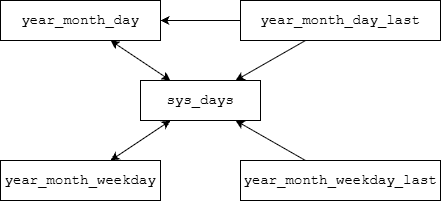
除了year_month_day,其他表示完整日期的类型(如year_month_day_last、year_month_weekday等)也可以隐式转换成sys_days。从而以sys_days为桥梁可以实现这些类型的相互转换。
例如,2026年的母亲节(五月的第二个星期日)是哪一天:
1
2
year_month_day mothers_day{2026y / May / Sunday[2]};
std::cout << "Mother's day in 2026 is " << mothers_day << '\n';
输出:
1
Mother's day in 2026 is 2026-05-10
日期类型之间的转换如下图所示。
2.4.4 当天时刻
前面介绍的日历类型只能表示年月日。类模板hh_mm_ss表示当天的时刻(时分秒,类名的字面意思)。
1
2
template<class Duration>
class hh_mm_ss;
可以用一个duration对象来构造hh_mm_ss,从而将其拆分为小时、分钟和秒,允许为负数或者超过24小时。例如:
1
2
hh_mm_ss t{100000s};
std::cout << "100000s = " << t.hours() << ' ' << t.minutes() << ' ' << t.seconds() << '\n';
输出:
1
100000s = 27h 46min 40s
可以像这样将time_point拆分为year_month_day和hh_mm_ss:
1
2
3
4
auto now = system_clock::now();
year_month_day today{floor<days>(now)};
hh_mm_ss time_of_day{now - floor<days>(now)};
std::cout << "now is " << today << ' ' << time_of_day << " (UTC)\n";
可能的输出:
1
now is 2026-11-07 07:34:25.814886000 (UTC)
注:C++20的year_month_day和hh_mm_ss分别相当于Java的LocalDate和LocalTime,以及Python的datetime.date和datetime.time。但没有相当于Java中LocalDateTime或Python中datetime.datetime的同时表示日期和时刻的类型。精确到秒(或以下)的时刻只能用time_point表示。
2.5 时区
C++20的时区支持基于IANA时区数据库,这是大多数操作系统和编程语言使用的标准时区数据源。
类std::chrono::time_zone表示一个时区。函数std::chrono::current_zone()返回系统本地时区;std::chrono::locate_zone()返回具有指定名称的时区,如果找不到则抛出异常std::runtime_error。
1
2
const time_zone* current_zone();
const time_zone* locate_zone(std::string_view tz_name);
例如:
1
2
3
4
5
6
7
8
9
10
11
12
13
14
#include <chrono>
#include <iostream>

int main() {
    std::cout << "current zone is " << std::chrono::current_zone()->name() << '\n';

    for (const auto name : {"Atlantic/Bermuda", "Alcatraz"}) {
        try {
            std::cout << std::chrono::locate_zone(name)->name() << '\n';
        } catch (std::runtime_error& e) {
            std::cout << e.what() << '\n';
        }
    }
}
可能的输出:
1
2
3
current zone is Asia/Shanghai
Atlantic/Bermuda
tzdb: cannot locate zone: Alcatraz
注:在Windows上,GCC标准库(libstdc++)的current_zone()始终返回 “Etc/UTC” (见std::chrono::current_zone() on windows),而MSVC标准库能返回正确时区。
2.5.1 时区时间
类模板std::chrono::zoned_time表示时区时间,即一对time_point和time_zone。
1
2
template<class Duration>
class zoned_time;
可以用时区和时间点来构造zoned_time,时区参数可以是const time_zone*,也可以是字符串。如果省略时区参数则默认为UTC。
例如:
1
2
3
4
5
6
7
8
9
10
11
12
13
14
15
16
17
18
19
20
#include <chrono>
#include <iomanip>
#include <iostream>

using namespace std::chrono;

int main() {
    const auto now = system_clock::now();
    std::cout << std::setw(33) << "Time point: " << now << '\n';

    zoned_time zt_utc{now};  // default time zone is UTC
    std::cout << std::setw(20) << zt_utc.get_time_zone()->name()
        << " zoned time: " << zt_utc << '\n';

    std::string_view zones[] = {"America/New_York", "Europe/London", "Asia/Shanghai"};
    for (auto zone : zones) {
        zoned_time zt{zone, now};
        std::cout << std::setw(20) << zone << " zoned time: " << zt << '\n';
    }
}
可能的输出:
1
2
3
4
5
                     Time point: 2026-11-08 03:18:04.592641200
             Etc/UTC zoned time: 2026-11-08 03:18:04.592641200 UTC
    America/New_York zoned time: 2026-11-07 22:18:04.592641200 EST
       Europe/London zoned time: 2026-11-08 03:18:04.592641200 GMT
       Asia/Shanghai zoned time: 2026-11-08 11:18:04.592641200 CST
注意,直接输出time_point等同于UTC时区的本地时间。
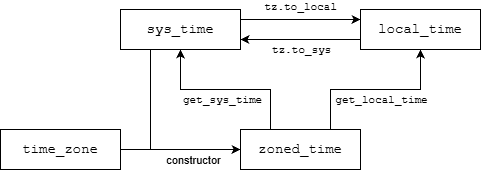
时区时间的成员函数get_sys_time()返回对应的系统时间,表示UTC时区的同一时刻;get_local_time()返回本地时间(等价于get_time_zone()->to_local(get_sys_time()))。
例如:
1
2
3
4
5
6
7
const auto now = floor<seconds>(system_clock::now());
zoned_time zt{"Asia/Shanghai", now};
sys_time st = zt.get_sys_time();
local_time lt = zt.get_local_time();
std::cout << "zoned time: " << zt << '\n'
    << "  sys time: " << st << '\n'
    << "local time: " << lt << '\n';
可能的输出:
1
2
3
zoned time: 2026-11-08 14:48:04 CST
  sys time: 2026-11-08 06:48:04
local time: 2026-11-08 14:48:04
下图总结了时区时间、系统时间和本地时间之间的转换。zoned_time、local_time和sys_time分别相当于Java的ZonedDateTime、LocalDateTime和Instant。
2.5.2 时区转换
zoned_time的构造函数也可以接受一个时区zone和另一个时区时间zt,表示将zt转换到时区zone的同一时刻,从而实现时区转换。zoned_time{zone, zt}等价于zoned_time{zone, zt.get_sys_time()}。
例如:
1
2
3
4
const auto now = floor<seconds>(system_clock::now());
zoned_time zt_shanghai{"Asia/Shanghai", now};
zoned_time zt_newyork{"America/New_York", zt_shanghai};
std::cout << zt_shanghai << '\n' << zt_newyork << '\n';
可能的输出:
1
2
2026-11-08 15:12:46 CST
2026-11-08 02:12:46 EST
如果需要将时间点转换到特定时区的本地时间,可以使用time_zone的to_local()函数。zone->to_local(tp)等价于zoned_time{zone, tp}.get_local_time()。例如:
1
2
3
4
5
6
7
8
const auto tp_utc = system_clock::now();
std::cout << "Current UTC time is:\t" << tp_utc << '\n';

local_time tp_local = current_zone()->to_local(tp_utc);
std::cout << "Current local time is:\t" << tp_local << '\n';

local_time tp_sydney = locate_zone("Australia/Sydney")->to_local(tp_utc);
std::cout << "Current Sydney time is:\t" << tp_sydney << '\n';
可能的输出:
1
2
3
Current UTC time is:	2026-11-08 07:26:02.0944287
Current local time is:	2026-11-08 15:26:02.0944287
Current Sydney time is:	2026-11-08 18:26:02.0944287
除了时区,chrono库还处理了夏令时、闰秒等复杂情况。
2.6 格式化与解析
2.6.1 格式化
Chrono库的时间类型支持用operator<<直接输出为默认格式。
C++20的std::format()支持chrono类型,并且允许自定义格式字符串。格式字符串可以包含strftime风格的日期时间转换说明符(见1.3节),含义也基本相同。例如:
1
2
3
4
5
6
7
8
9
10
#include <chrono>
#include <format>
#include <iostream>

using namespace std::chrono;

int main() {
    year_month_day date = 2025y / March / 15;
    std::cout << std::format("{:%Y-%m-%d}", date) << '\n';
}
输出:
1
2025-03-15
每种时间类型支持的转换说明符由对应的std::formatter特化决定,例如std::formatter<std::chrono::year_month_day>和std::formatter<std::chrono::zoned_time>。
2.6.2 解析
解析是格式化的逆操作。Chrono库提供了函数std::chrono::from_stream()和std::chrono::parse()来解析日期时间类型。
注:GCC 14才支持这两个函数。
from_stream(is, fmt, t)从输入流is按照格式字符串fmt解析日期或时间对象t,返回is。如果解析失败,则设置输入流的failbit。
例如,下面的代码从字符串输入流解析system_clock::time_point:
1
2
3
4
std::istringstream is("2025-03-15 09:22:40");
std::chrono::system_clock::time_point tp;
std::chrono::from_stream(is, "%Y-%m-%d %H:%M:%S", tp);
is.fail() ? std::cout << "Parse failed!\n" : std::cout << tp << '\n';
输出:
1
2025-03-15 09:22:40
也可以解析year_month_day:
1
2
3
std::istringstream is("2025-03-15");
std::chrono::year_month_day date;
std::chrono::from_stream(is, "%Y-%m-%d", date);
如果格式串包含%Z或%z,还可以额外传入字符串指针和std::chrono::minutes指针来接收时区信息。
函数std::chrono::parse()的作用和std::chrono::from_stream()相同,只是用法有所区别:is >> parse(fmt, t)等价于from_stream(is, fmt, t)。
下面的程序从输入流读取并解析学生的ID、姓名和生日信息。格式字符串" %Y-%m-%d"开头的空格用于跳过生日前面的空白符,以免解析失败。
1
2
3
4
5
6
7
8
9
10
11
12
13
14
15
16
17
18
19
20
21
22
23
24
25
26
27
28
29
30
31
32
33
34
35
36
37
#include <chrono>
#include <iostream>
#include <format>
#include <map>
#include <sstream>
#include <string>

struct Student {
    int id;
    std::string name;
    std::chrono::year_month_day birthday;
};

std::map<int, Student> read_student_info(std::istream& is) {
    std::map<int, Student> students;
    Student s;
    while (is >> s.id >> s.name >> std::chrono::parse(" %Y-%m-%d", s.birthday)) {
        students[s.id] = s;
    }
    return students;
}

int main() {
    std::string data = R"(
        1001 Alice 1998-04-13
        1002 Bob   1997-08-28
        1003 Cindy 2001-10-04
    )";
    std::istringstream iss(data);
    std::map<int, Student> students = read_student_info(iss);

    std::cout << std::format("{:5s} {:10s} {}", "ID", "Name", "Birthday") << '\n';
    for (const auto& [id, student] : students) {
        std::cout << std::format("{:<5d} {:10s} {:%Y-%m-%d}",
            id, student.name, student.birthday) << '\n';
    }
}
输出:
1
2
3
4
ID    Name       Birthday
1001  Alice      1998-04-13
1002  Bob        1997-08-28
1003  Cindy      2001-10-04